
MTS Consulting Group, Inc.
Cyber Liability Knowledge Center
Series: Building Business Resilience
The Quick Answer
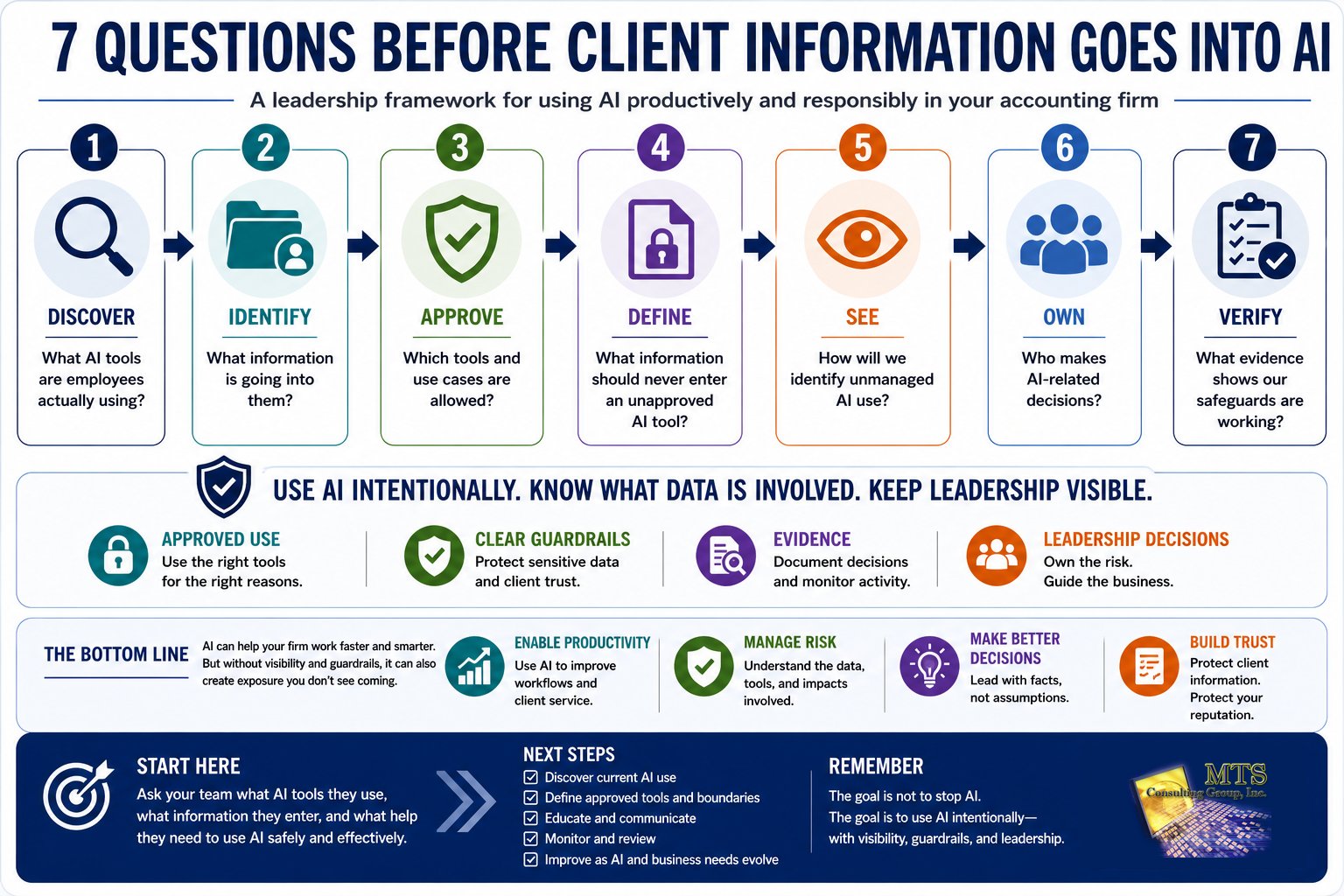
Before employees put client information into an AI tool, accounting and tax firm leaders should be able to answer seven questions:
- What AI tools are employees actually using?
- What information are they putting into those tools?
- Which AI tools and uses has the firm approved?
- What information should never be entered into an unapproved AI tool?
- How would the firm discover unapproved AI use?
- Who is responsible for making AI-related decisions?
- What evidence shows the firm's AI safeguards are actually working?
The goal does not have to be stopping employees from using AI.
AI can create real productivity gains.
The leadership challenge is making sure AI adoption does not move faster than the firm's ability to understand and manage the risk it creates.
AI Is a Business Decision, Not Just a Technology Decision
AI is rapidly becoming another everyday business tool.
Employees can use it to:
- Draft emails
- Summarize documents
- Brainstorm ideas
- Research topics
- Organize information
- Create meeting notes
- Analyze data
- Improve written communications
- Automate repetitive work
Those capabilities can be useful.
But accounting and tax firms have an additional consideration: employees routinely work with information that clients expect the firm to protect.
That may include:
- Taxpayer information
- Social Security numbers
- Financial statements
- Payroll information
- Banking information
- Client correspondence
- Business records
- Employee information
- Authentication information
The question, therefore, isn't simply whether AI is useful.
How can the firm benefit from AI without losing visibility or control over sensitive information?
That is a leadership question.
AI May Already Be in Your Firm
One of the biggest mistakes leadership can make is assuming that AI adoption begins when the firm officially purchases an AI product.
Employees may already be using AI.
Consider an employee who receives a long client email and thinks:
"I can paste this into an AI tool and have it summarize the important points."
Or an employee working with a complicated document who thinks:
"AI could review this in 30 seconds."
Or someone who needs to write a difficult client communication and decides:
"I'll give AI the background and let it create a first draft."
None of those employees necessarily intends to create risk.
They are trying to work more efficiently.
That is precisely why leadership needs to understand what is happening.
The first question should not be:
"Who is breaking our AI policy?"
It should be:
"How are our people actually using AI?"
You cannot make good decisions about activity you cannot see.
What Is Shadow AI?
A useful term for unapproved or unmanaged AI use is Shadow AI.
Shadow AI occurs when employees use AI applications or features outside the organization's approved or managed environment.
That might include:
- A public AI website
- A personal AI account
- A browser extension
- A free AI application
- An AI assistant built into another product
- A new AI service someone discovered online
Shadow AI does not automatically mean an employee is behaving maliciously.
Often, the opposite is true.
The employee has found a useful tool and is trying to solve a business problem.
The risk is that leadership may not know:
- Which tool is being used
- What information is being entered
- Who owns the account
- How the information is handled
- Whether the use is appropriate
- Whether sensitive client information is involved
That creates an important gap between what leadership assumes is happening and what employees may actually be doing.
The Seven Questions Accounting Firm Leaders Should Ask About AI
A complicated subject becomes easier when leadership has a repeatable framework.
Start with seven questions.
Question 1: What AI Tools Are Employees Actually Using?
Don't begin with the list of AI products the firm has purchased.
Begin with reality.
Ask employees:
- Do you currently use AI for work?
- Which tools do you use?
- What tasks do you use them for?
- Are you using a business account or personal account?
- Do you use browser extensions with AI capabilities?
- Have applications you already use introduced AI features?
- Have you found AI tools that make your work easier?
The purpose of these questions should be discovery.
If employees think the goal is punishment, leadership may get incomplete answers.
What the firm needs first is visibility.
A Simple Starting Point
Create a basic inventory:
| AI Tool | Who Uses It? | Business Purpose | Information Involved |
|---|---|---|---|
| Tool A | Tax team | Drafting | Generic |
| Tool B | Administration | Meeting summaries | Internal |
| Tool C | Unknown | Unknown | Unknown |
The third row is not necessarily a crisis.
It is a question that needs an answer.
Question 2: What Information Are Employees Putting Into AI?
This may be more important than which AI product they use.
Consider two employees using the same AI platform.
Employee A asks:
"Give me five subject-line ideas for a tax-season reminder email."
Employee B uploads a client's completed tax documents and asks:
"Summarize the client's financial position and identify anything unusual."
Those are not the same risk.
The application may be identical.
The information and use case changed.
That is why AI governance should begin with data.
Leadership should understand whether employees are using:
Public Information
Information already intended for public consumption.
Internal Business Information
Processes, meeting notes, internal communications, operating information, or other non-public material.
Client Information
Documents, correspondence, financial information, or other client-specific material.
Highly Sensitive Information
Information such as taxpayer identification information, Social Security numbers, financial-account information, credentials, or other data the firm considers particularly sensitive.
The firm can then establish different rules for different types of information.
Question 3: Which AI Tools and Uses Are Approved?
Employees need a practical answer.
"Use AI responsibly" is not a practical answer.
Neither is:
"Don't put anything confidential into AI."
What does confidential mean?
Does it include a client's name?
An email?
A tax question with identifying details removed?
Internal meeting notes?
A spreadsheet?
Employees should not have to invent the firm's policy every time they encounter a new use case.
Leadership should define:
- Which AI tools are approved
- Which accounts should be used
- Which business purposes are approved
- Which information is appropriate
- Which activities require additional approval
- Where employees should go when they are unsure
The clearer the approved path is, the easier it becomes for employees to follow it.
Question 4: What Information Should Never Go Into an Unapproved AI Tool?
Every accounting and tax firm should establish clear boundaries.
The exact boundaries will depend on the firm's business, professional responsibilities, technology environment, and appropriate professional guidance.
Leadership should explicitly consider information such as:
- Social Security numbers
- Taxpayer identification information
- Bank-account information
- Payroll records
- Authentication credentials
- Tax returns
- Client financial statements
- Confidential client documents
- Sensitive employee information
- Proprietary business information
The point isn't to make employees memorize a complicated data-classification system.
The point is to make the important decisions clear enough that an employee can recognize:
"I shouldn't put this information into an unapproved AI tool."
Question 5: How Would We Know If Someone Uses an Unapproved AI Tool?
This is where a policy and a management system become different.
Imagine that leadership has established:
"Employees may only use approved AI tools for company work."
Now ask:
How would we know if they don't?
The answer does not necessarily require intrusive employee surveillance.
But leadership should understand what visibility exists.
That might involve some combination of:
- Employee conversations
- Training
- Application inventories
- Browser or network visibility
- Security monitoring
- Periodic reviews
- Technical safeguards
- Exception reporting
The appropriate approach depends on the organization.
The principle is simpler:
A written rule tells leadership what should happen. Evidence helps leadership understand what is happening.
Question 6: Who Owns AI Decisions?
AI cannot become another version of:
"I thought IT handled that."
AI involves technology, but AI decisions may also involve:
- Business operations
- Client service
- Employee behavior
- Information protection
- Professional responsibilities
- Legal considerations
- Reputation
That means ownership should be explicit.
Leadership
Determines acceptable business use and risk tolerance.
Technology and Security
Help implement approved tools, access, monitoring, and technical safeguards.
Department Leaders
Identify valuable use cases and workflow requirements.
Employees
Follow established expectations and ask when uncertain.
Qualified Professional Advisors
Provide guidance when a question requires legal, regulatory, HR, or other specialized expertise.
The important question isn't whether one person owns everything.
It is:
Does everyone understand their part?
Question 7: What Evidence Shows Our AI Safeguards Are Working?
Eventually leadership should be able to move beyond:
"We have an AI policy."
and answer:
"How do we know our approach is working?"
Useful evidence might include:
- An inventory of approved AI tools
- Documented AI-use guidance
- Employee education records
- Defined data boundaries
- Access controls
- Identified unapproved applications
- Records of exceptions
- Decisions about identified risks
- Periodic leadership reviews
Not every firm needs every item.
The objective is not paperwork.
The objective is confidence based on something more than assumption.
Seven Questions Before Client Information Goes Into AI
Why Banning AI May Not Solve the Problem
Leadership may respond to uncertainty by banning AI entirely.
For some organizations or particular use cases, restricting AI may be appropriate.
But a blanket prohibition does not automatically eliminate AI use.
Why?
Because employees have an incentive to use tools that make their jobs easier.
Consider a simple hypothetical example.
An AI tool saves an employee 15 minutes per document.
The employee works on 20 documents each week.
15 minutes × 20 documents = 300 minutes
That equals:
5 Hours of Potential Time Savings per Week
If the tool genuinely saves that much time, leadership should expect employees to be interested.
The better question becomes:
"Can we preserve the productivity benefit while creating an appropriate way to manage the information and risk?"
The Goal Should Be Safe Enablement, Not Fear
There are two extremes leadership should avoid.
Extreme 1: Ignore AI
"Employees will figure it out."
This provides little visibility.
Extreme 2: Fear AI
"AI is too dangerous. Nobody can use it."
This may discourage employees from telling leadership how AI could improve their work, or encourage AI use to move underground.
There is a middle path.
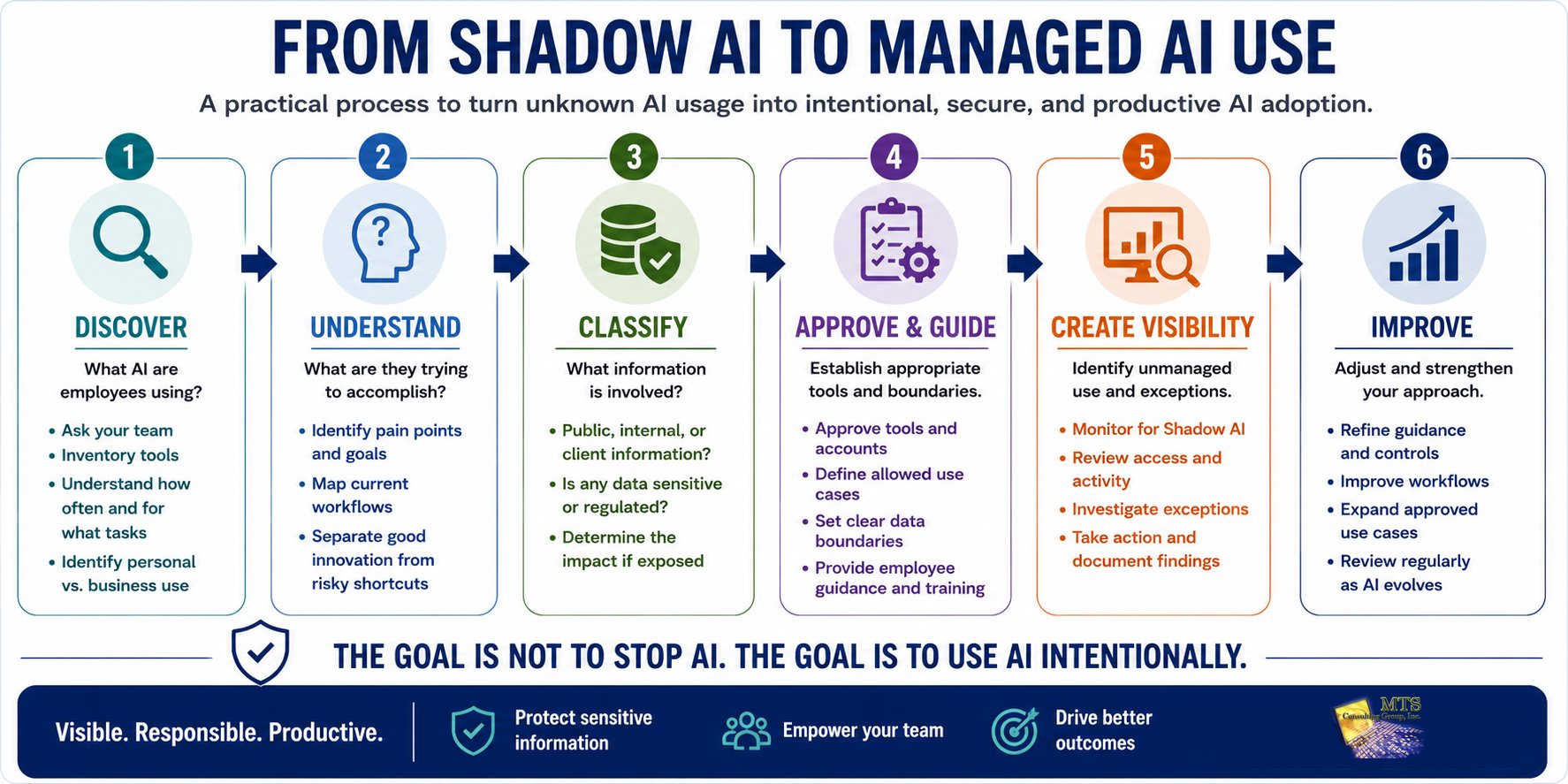
Discover
Understand current usage.
Evaluate
Understand the information and business purpose.
Approve
Create acceptable tools and use cases.
Educate
Help employees understand the boundaries.
Monitor
Maintain reasonable visibility.
Improve
Adjust the approach as the technology and business change.
That turns AI from an uncontrolled experiment into a business capability that can be managed.
From Shadow AI to Managed AI Use
AI Should Be Evaluated Through Business Risk
AI can sound like a completely new category of risk.
From a leadership perspective, it becomes easier to understand when connected to familiar business consequences.
For the Cyber Liability Knowledge Center, we look at four areas.
Business & Operational Risk
Ask:
Could this AI use affect our ability to operate or produce reliable work?
Consider situations such as:
- Employees relying on inaccurate AI output
- Important workflows depending on personal AI accounts
- AI-generated work being used without human review
- Processes becoming dependent on a tool leadership does not manage
- AI automations behaving differently than expected
The concern is not simply whether AI makes mistakes.
People make mistakes too.
The leadership question is whether the business has a process for recognizing and managing the possibility.
Legal Risk
Ask:
Could this AI use create responsibilities that require qualified legal guidance?
There may be situations involving:
- Client information
- Contracts
- Confidentiality
- Intellectual property
- Employee matters
- Other legal considerations
Technology professionals should not turn those questions into unauthorized legal conclusions.
Their job is to help establish the technical facts:
- What tool was used?
- What information was involved?
- What happened?
- What evidence exists?
Leadership can then involve appropriate legal counsel when necessary.
Regulatory Risk
Ask:
Could this AI use affect responsibilities the firm is expected to manage?
AI does not make existing information-protection responsibilities disappear.
If information deserves protection when it is stored, emailed, or accessed through another business application, leadership should consider what happens when that same information is placed into an AI system.
The technology may be new.
The underlying responsibility to make informed decisions about sensitive information is not.
Reputational Risk
Ask a simple question:
"Would we be comfortable explaining this exact AI use to the client?"
That is a powerful test.
A client may be perfectly comfortable with the firm using AI to improve productivity.
But consider the difference between:
"We use approved AI tools to help employees create first drafts of generic communications."
and:
"An employee uploaded your financial records to a tool we didn't know the firm was using."
The issue is not simply AI.
It is trust.
A Practical Accounting-Firm Scenario
Consider a 25-person accounting firm.
Leadership knows some employees use AI but has never formally discussed how.
Rather than immediately banning it, the firm asks employees how they are using AI.
Three patterns emerge.
Group 1: Generic Drafting
Employees use AI to create generic email drafts, meeting agendas, and brainstorming ideas.
No client-specific information is intentionally included.
Group 2: Client Communication
Employees sometimes paste client emails into an AI tool to summarize the conversation or help draft a response.
Group 3: Document Analysis
One employee occasionally uploads longer client documents because AI can summarize them much faster.
Now leadership has something it did not have before.
Visibility.
Why the Three Uses Are Different
The firm can evaluate the three uses differently.
Generic drafting may require relatively simple guidance.
Client communications may require stronger data boundaries.
Uploading client documents may require a different approved environment, or may be prohibited depending on the firm's policies and circumstances.
Leadership can now make deliberate decisions instead of trying to manage an unknown problem.
This is an educational scenario, not an actual MTS client engagement. The behaviors are examples intended to show why different AI uses deserve different risk decisions.
Don't Punish Employees for Finding Better Ways to Work
An employee who finds a faster workflow may have discovered something valuable.
Suppose someone says:
"I can reduce this 30-minute task to 10 minutes with AI."
Leadership should be interested.
The next questions should be:
- What task?
- Which AI tool?
- What information is involved?
- How accurate is the result?
- Does a person review the output?
- Can we accomplish the same thing through an approved process?
- What safeguards would we need?
That conversation does two things.
It protects the organization.
And it encourages employees to bring innovation to leadership instead of hiding it from leadership.
That is a much healthier culture.
Human Review Still Matters
Another important AI question has nothing to do with data exposure.
It is accuracy.
AI can produce information that sounds confident and is still wrong.
For an accounting or tax firm, that matters.
Leadership should define where human review remains necessary.
The standard should not be:
"AI generated it, so it must be correct."
Nor should it be:
"AI can never be trusted."
The useful question is:
"What level of human review does this use case require before the output affects a client or business decision?"
A brainstorming tool and a client deliverable may deserve very different review standards.
AI Features Can Appear Inside Software You Already Approved
AI governance is not limited to standalone AI websites.
Existing software products increasingly add AI capabilities.
That means a firm may approve an application for one purpose and later discover that the application now includes AI features that interact with information differently.
Leadership should periodically ask:
- What new AI capabilities have our existing applications added?
- Are employees using them?
- What information can those features access?
- Are our original assumptions still accurate?
An approved application does not mean every future feature automatically fits the firm's intended use.
What Should a Practical AI Policy Answer?
Employees do not need a policy written only for lawyers or technologists.
They need guidance they can actually use.
At minimum, employees should be able to answer:
- What AI tools can I use?
- What can I use them for?
- What information can I put into them?
- What information should I keep out?
- What should I do when I'm unsure?
- Who can approve a new tool or use case?
- Do AI-generated results require human review?
Those seven answers may do more to change behavior than pages of vague policy language.
What If Employees Are Already Using Unapproved AI?
Do not automatically assume the worst.
Start with facts.
- Which tool was used?
- What was it used for?
- What information was entered?
- Was client information involved?
- Was the information sensitive?
- How often has the activity occurred?
- What evidence exists?
- Why did the employee choose that tool?
Then determine what response fits the facts.
Educate
The employee misunderstood the rule.
Redirect
An approved alternative exists.
Investigate
More information is needed.
Document
The issue and decision should be recorded.
Change the Process
The unapproved tool exposed a legitimate business need that the existing workflow does not solve.
Escalate
The facts may warrant additional technical, leadership, legal, or other qualified professional review.
Different facts deserve different responses.
Start With Three AI Use Cases
For a firm that wants to adopt AI but does not know where to begin, don't start with 30 ideas.
Choose three potential use cases.
Prefer tasks that are:
- Repetitive
- Time-consuming
- Easy for a person to review
- Relatively low sensitivity
- Clearly useful
For each use case, answer five questions:
- What are we trying to improve?
- What information does the task require?
- Which AI environment is appropriate?
- Who reviews the result?
- How will we know whether the use is actually valuable?
Then test.
Measure.
Learn.
Expand intentionally.
That is more useful than telling the entire firm:
"Go experiment with AI."
A Five-Minute AI Leadership Check
You can begin this conversation without buying anything.
At your next leadership meeting, ask five questions.
1. Which AI tools are employees using today?
If nobody knows, you have identified your first gap.
2. Is client information being entered into any of them?
Do not assume.
Find out.
3. Do employees know which uses are approved?
If employees would give different answers, the guidance probably needs clarification.
4. How would we know if an unapproved AI tool were being used?
Understand what visibility exists.
5. Who owns the next decision?
Assign responsibility.
That conversation can take less time than choosing a new AI product.
And it may be considerably more valuable.
Frequently Asked Questions
Can Accounting and Tax Firms Use AI Safely?
AI can be useful for accounting and tax firms, but leadership should understand which tools employees use, what information is involved, which uses are approved, what safeguards exist, and where human review is required.
There is no single answer for every AI use case.
The risk depends on the tool, information, purpose, safeguards, and business context.
Should Employees Put Client Information Into Public AI Tools?
Firms should establish explicit guidance before employees place sensitive client information into any unapproved AI platform.
Leadership should understand what information is involved, why the employee needs to use it, which platform is being used, and what safeguards and professional responsibilities apply.
What Is Shadow AI?
Shadow AI is the use of AI applications or features outside an organization's approved or managed AI environment.
It can include personal accounts, public AI services, browser extensions, embedded AI features, or other tools leadership does not know employees are using.
Is Having an AI Policy Enough?
No.
A policy establishes expectations.
Effective AI governance also requires clear ownership, employee education, approved use cases, appropriate safeguards, visibility, and periodic review.
Should Accounting Firms Ban AI?
There is no universal answer.
Some uses may need to be restricted, while other uses may create legitimate productivity benefits.
Leadership should evaluate the information involved, business purpose, tool, safeguards, and potential consequences before deciding.
What Information Deserves the Most Attention?
Accounting and tax firms should pay particular attention to sensitive client and business information, including taxpayer information, financial records, Social Security numbers, banking information, credentials, confidential documents, and other information the firm has a responsibility to protect.
Should Employees Review AI-Generated Work?
For business uses where accuracy matters, human review should be considered.
The level of review should reflect the consequences of an incorrect output.
A brainstorming idea and client-facing professional work should not automatically be treated the same way.
Who Owns AI Governance?
Leadership ultimately owns business decisions about acceptable AI use.
Technology and security professionals can help implement safeguards. Department leaders can help identify useful applications. Employees follow established expectations. Qualified legal and other professional advisors should be involved when questions fall within their expertise.
How Often Should an AI Policy Be Reviewed?
There is no single interval appropriate for every firm.
Because AI capabilities and employee usage are changing quickly, firms should review AI governance periodically and when significant changes occur, such as new tools, new embedded AI features, new use cases, or meaningful changes in the information being processed.
The MTS Perspective
AI creates an interesting leadership challenge because the opportunity and the risk can come from exactly the same place.
An employee finds a faster way to work.
That's potentially valuable.
The employee uses sensitive information in a way leadership does not understand.
That's potentially a Cyber Liability issue.
We don't believe those two realities require a choice between innovation and protection.
They require clarity.
Before making an AI decision, leadership should understand:
- What are people actually doing?
- What information is involved?
- What business benefit are we trying to preserve?
- What could go wrong?
- What safeguards make sense?
- Who owns the decision?
- What evidence will tell us whether the approach is working?
Then look at the whole risk:
Business & Operational.
Legal.
Regulatory.
Reputational.
AI will continue changing.
Specific products will come and go.
The leadership discipline should remain:
Understand first. Decide second. Implement third. Verify what actually happens.
That is how an organization can pursue innovation without allowing innovation to outrun responsibility.
Understand.
Decide.
Implement.
Verify.
The goal is not to eliminate every risk associated with AI.
It is to make sure leadership understands the risk well enough to make an informed decision.
Specificity creates clarity.
And clarity is a much better starting point than fear.
Your Next Step
Don't begin by buying an AI security product.
Don't begin by banning AI.
And don't begin with a 25-page policy.
Begin with a conversation.
Ask your employees:
"Which AI tools are you using for work, and what are you using them for?"
Then ask:
"Does any client or sensitive business information go into those tools?"
Write down the answers.
From there:
- Identify the tools already in use.
- Identify the information involved.
- Define approved uses.
- Establish clear boundaries.
- Assign ownership.
- Determine what visibility is appropriate.
- Review the decisions as AI usage changes.
Understanding first. Decide second. Implement third.
Before adding more AI tools, understand how AI is already being used, what information is involved, and where leadership may lack visibility.
MTS helps accounting and tax firms turn the AI question from a technology concern into a leadership conversation.
Start by asking your team which AI tools they use and what information goes into them.
Start an AI Risk Conversation.
Continue Through the Cyber Liability Knowledge Center
Start Here:
What Is Cyber Liability, and How Is It Different from Cybersecurity?
Previous Chapter:
What Should the First 90 Days of Reducing Cyber Liability Look Like for an Accounting Firm?
Related chapters:
- What Is Cyber Liability, and How Is It Different from Cybersecurity?
- What Are the Four Business Risks Every Accounting Firm Should Understand Before Investing in Cybersecurity?
- Why Doesn't Traditional IT Support Fully Address Cyber Liability?
- What Should Managed IT Actually Do to Reduce an Accounting Firm's Business Risk?
- What Should Tax Professionals Understand About IRS Publication 4557 Beyond the Checklist?
- How Does an Independent Cyber Risk Assessment Help Accounting Firm Leaders Make Better Decisions?
- What Should the First 90 Days of Reducing Cyber Liability Look Like for an Accounting Firm?
Explore MTS services: