
The Quick Answer
Managed IT should do more than keep computers running.
For an accounting or tax firm, effective managed IT should create a reliable technology foundation that helps the organization:
- Keep employees productive
- Maintain and stabilize critical systems
- Identify recurring problems before they become larger disruptions
- Support appropriate cybersecurity protections
- Create useful documentation and evidence
- Give leadership visibility into technology risks and decisions
But there is an important distinction.
Managed IT is the foundation. It is not the full Cyber Liability program.
Managed IT reduces portions of an organization’s Operational, Legal, Reputational, and Regulatory risk, but technology support alone cannot own every business decision.
At MTS Consulting Group, we believe good managed IT should help leadership move from:
Reactive → Proactive → Evidence-Based → Informed
The goal is not simply fewer tickets.
The goal is a healthier organization with clearer decisions and less unnecessary Cyber Liability.
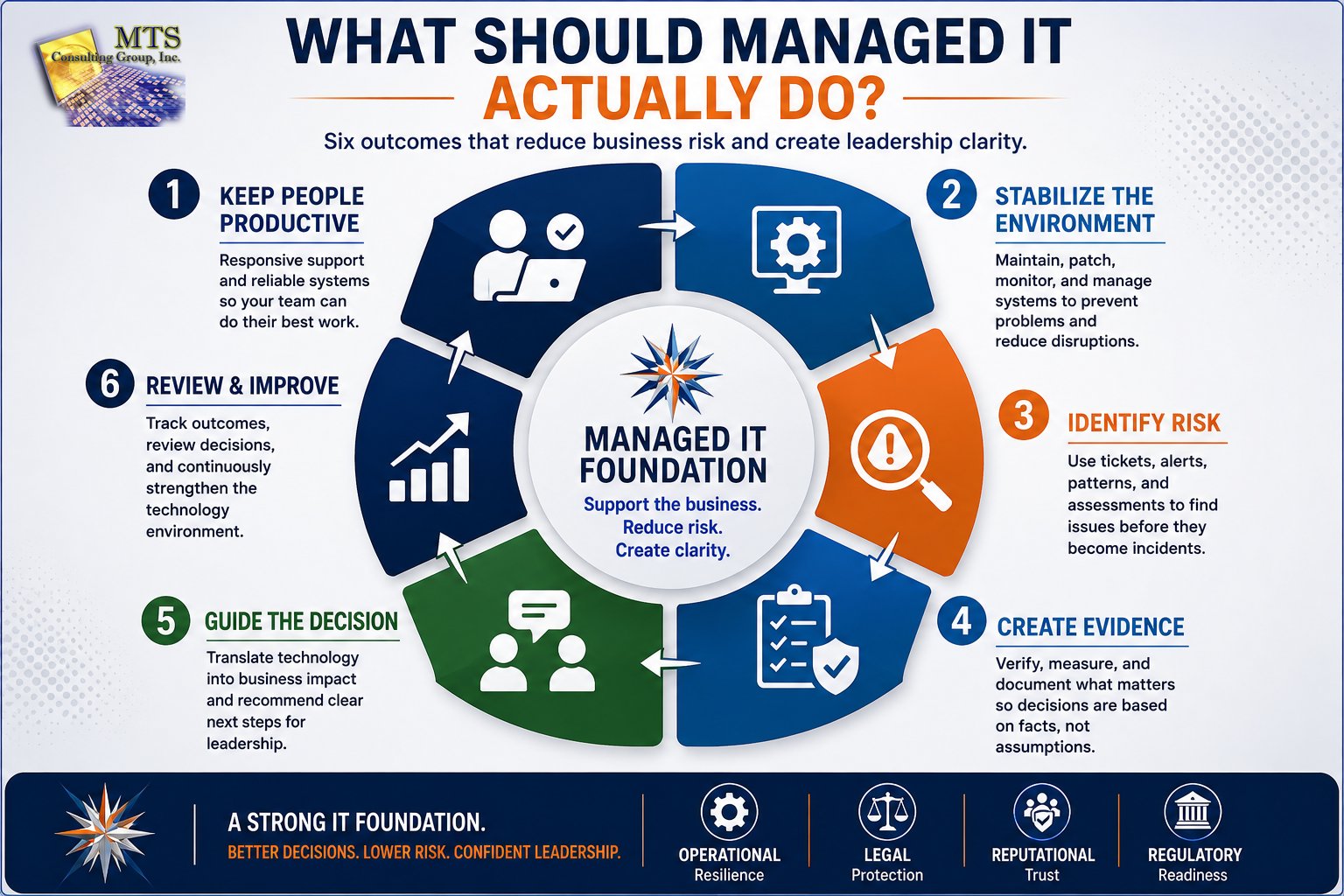
Managed IT is the foundation. It is not the full Cyber Liability program.
The goal is a healthier organization with clearer decisions and less unnecessary Cyber Liability.
Managed IT Should Produce Business Outcomes - Not Just Technical Activity
Most managed IT agreements describe activities.
Monitoring.
Patching.
Help desk.
Remote support.
Microsoft 365 administration.
Device management.
Network management.
Those activities matter.
But an accounting-firm leader should ask another question:
What business outcome are these activities supposed to produce?
A patching service should not exist merely so a provider can report that patches were deployed.
It should reduce the likelihood that known technology weaknesses create business disruption or security exposure.
A help desk should not exist merely to close tickets.
It should help employees return to productive work quickly while identifying patterns that may point to larger problems.
Monitoring should not exist because dashboards look impressive.
Monitoring should identify issues early enough for someone to make a useful decision.
Documentation should not exist because an MSP needs internal notes.
It should reduce dependency on memory, improve support, create accountability, and preserve evidence of what was done.
The technical activity matters.
The business outcome matters more.
The MTS Perspective: Managed IT Should Help Create Clarity
One of the core operating principles at MTS is:
Create Clarity Before Action.
That principle belongs inside managed IT just as much as it belongs inside a strategic meeting.
When a problem occurs, good managed IT should help answer:
- What happened?
- What is affected?
- What do we know?
- What do we not know yet?
- What happens next?
- Who owns the next action?
- When will the client hear from us again?
That is more than communication etiquette.
It is risk management.
Confusion creates delay.
Delay creates operational impact.
Poor documentation creates repeated mistakes.
Unclear ownership allows important work to disappear.
A healthy managed IT relationship should reduce those problems.
The Six Outcomes Managed IT Should Produce
Rather than evaluating an IT provider only by tools or ticket statistics, leadership can look for six outcomes.
Outcome #1: Keep People Productive
The first responsibility of managed IT is straightforward:
Help people work.
For an accounting or tax firm, that means employees need reliable access to:
- Tax applications
- Accounting platforms
- Client records
- Microsoft 365
- Documents
- Printers and scanners
- Remote access
- Communication systems
- Internet connectivity
- Other business-critical applications
Technology disruption has a multiplying effect.
If one employee loses 30 minutes, the impact may be small.
If 30 employees lose 30 minutes during a critical business period, the firm loses:
30 employees × 0.5 hours = 15 productive hours
The technical issue may have lasted only 30 minutes.
The business experienced 15 hours of lost capacity.
That distinction matters.
Outcome #2: Maintain a Stable Technology Foundation
Managed IT should reduce avoidable instability.
That includes maintaining the technology environment so routine issues do not repeatedly become emergencies.
Depending on the organization and agreement, that may include:
- Device monitoring
- Patch management
- System maintenance
- Endpoint management
- Microsoft 365 administration
- Network support
- Remote-access management
- User onboarding and offboarding
- Technology documentation
- Hardware lifecycle planning
- Vendor coordination
The purpose is not merely to perform maintenance.
The purpose is to create a healthier environment.
A well-managed environment should gradually require less unnecessary firefighting, not more.
If the same technical problems continue appearing month after month, the provider should be asking:
Why does this keep happening?
That question moves managed IT from reactive support toward proactive management.
Tickets Are More Than Problems to Close
A support ticket can tell you more than what happened to one employee.
It can reveal a pattern.
Consider these examples:
One Password Reset
Probably a normal support request.
Repeated Password Problems
Possibly an identity-management, training, or process issue.
One Device Running Slowly
Possibly a local hardware issue.
Ten Similar Devices Running Slowly
Possibly a lifecycle, configuration, software, or infrastructure pattern.
One Remote-Access Problem
Possibly an isolated incident.
Repeated Remote-Access Problems
Possibly a larger operational dependency that deserves review.
The point is not to turn every ticket into a major security investigation.
The point is to pay attention.
Recurring activity can become evidence.
Good managed IT should identify those patterns and decide whether something larger needs to happen.
The MTS Proactive Principle: The Dashboard Should Produce an Action
Technology providers have access to enormous amounts of information.
Monitoring tools generate alerts.
Security products generate reports.
Management platforms create dashboards.
Backup systems generate status messages.
Tickets generate history.
The danger is collecting data without converting it into action.
At MTS, we use a simple principle:
The point is not to admire the dashboard. The point is to decide.
Sometimes the decision is:
No action required.
Sometimes the result should become:
- A new support ticket
- An update to an existing ticket
- Alert tuning
- A remediation script
- A documentation update
- Client communication
- An escalation
- A roadmap item
- A recommendation for the next leadership review
Data becomes valuable when it leads to a decision.
Outcome #3: Reduce Preventable Risk
Managed IT should support appropriate cybersecurity protections.
But this is where terminology often becomes confusing.
“Security included” does not tell leadership enough.
Depending on the organization, effective protection may involve areas such as:
- Endpoint security
- Identity protection
- Multifactor authentication
- Access management
- Threat monitoring
- DNS protection
- Secure connectivity
- Vulnerability management
- Security awareness
- Backup protections
- Other safeguards appropriate to the environment
The goal is not to collect tools.
The goal is to reduce meaningful exposure.
That means every significant security control should eventually answer:
What risk does this reduce?
A product without a business purpose is just another subscription.
Tool Management Is Not Risk Management
This is an important distinction.
Tool management asks:
“Is the product installed?”
Risk management asks:
“What risk remains?”
For example:
A security product may be installed on 97% of devices.
That sounds good.
But leadership should also know:
- Which devices are missing?
- Why?
- What do those devices access?
- Does the gap matter?
- Who owns the next action?
That transforms a technical statistic into a business decision.
Managed IT should contribute evidence to that conversation.
Outcome #4: Create Evidence, Not Assumptions
Leadership should be cautious with statements such as:
- “We should be fine.”
- “I think that’s configured.”
- “The vendor handles it.”
- “We have backups.”
- “We already have security.”
Those statements describe belief.
They do not necessarily describe evidence.
A healthier managed IT relationship helps replace assumptions with verifiable information.
This may include evidence showing:
- Devices are managed
- Security tools are reporting
- Patches were applied
- MFA is configured
- Access was removed
- Backup jobs completed
- Recovery testing occurred
- Recommendations were made
- Decisions were recorded
- Projects were completed
At MTS, we believe:
Documentation is protection.
It protects the client because leadership gains clarity.
It protects the provider because responsibilities become visible.
It protects the team because important information does not depend on one person’s memory.
If It Isn’t Documented, It Can Disappear
Imagine that leadership approves an important recommendation during a phone call.
Everyone understands the decision.
The meeting ends.
Nothing is documented.
Six months later:
- Someone changes roles.
- The provider’s account manager changes.
- Leadership remembers the conversation differently.
- The project was never scheduled.
- An incident occurs.
Now the organization is reconstructing an important decision from memory.
That is unnecessary risk.
Good managed IT should create a documentation trail around important work.
Not because paperwork is the goal.
Because organizational memory matters.
Outcome #5: Help the Firm Recover
Many technology conversations focus on prevention.
Prevention matters.
But no responsible technology provider should promise that nothing will ever fail.
Hardware fails.
Software fails.
Cloud services experience outages.
Accounts get compromised.
People make mistakes.
Vendors have incidents.
Cyber events occur.
That means managed IT should help leadership understand recovery.
The key question is not:
“Do we have backups?”
It is:
“If we needed to restore the business tomorrow, what could we recover and how long would it take?”
Those are different questions.
Backup Is a Technical Function
A backup system copies data.
Recovery Is a Business Outcome
Recovery determines whether the organization can resume operating.
Leadership cares about the second question.
Recovery Expectations Must Match Reality
Suppose leadership believes:
“We could be back online in two hours.”
But the technology provider has never verified that expectation.
That creates risk.
The issue is not that recovery will definitely fail.
The issue is that leadership is making business assumptions without evidence.
Good managed IT should help clarify:
- What is protected?
- What is not protected?
- What recovery options exist?
- How long might recovery take?
- What dependencies exist?
- What has been tested?
- What still needs improvement?
Create clarity before the incident forces the question.
Outcome #6: Give Leadership Something Useful to Decide
Traditional IT reviews sometimes focus heavily on:
- Ticket counts
- SLA statistics
- Device inventories
- Patch percentages
- Hardware lists
- Licensing reports
Those numbers may be useful internally.
But an executive conversation should go further.
Leadership needs answers to four questions:
1. What does the evidence tell us?
What has actually been observed?
2. What matters most?
Which one to three issues create the greatest meaningful business exposure?
3. What do you recommend?
Translate the finding into a practical next step.
4. What decision do we need to make?
Accepted?
Deferred?
Declined?
Needs investigation?
That is how managed IT becomes part of strategic business protection.
From Ticket Review to Strategic Security Briefing
At MTS, leadership reviews should not simply become ticket reviews.
The purpose of a Strategic Security Briefing is different.
It should help decision makers understand:
- What has changed
- What evidence exists
- What risk remains
- What progress has been made
- What recommendations deserve attention
- What decisions need to happen next
The briefing should not overwhelm leadership with every technical detail.
A strong review usually focuses on one to three meaningful recommendations, not dozens of findings.
For each recommendation, leadership should understand:
- What did we find?
- Why does it matter?
- What Cyber Liability could it create?
- What do we recommend?
- What happens if we wait?
- Who owns the decision?
That is a business conversation.
The MTS Managed IT Risk-Reduction Cycle
A useful model for evaluating managed IT is a six-step cycle.
Step 1: Observe
Monitor the environment.
Listen to users.
Review tickets.
Review alerts.
Look for changes.
Step 2: Identify
Determine whether the issue is:
- Isolated
- Recurring
- Operational
- Security-related
- Lifecycle-related
- Documentation-related
- A larger Cyber Liability concern
Step 3: Explain
Translate technical information into business language.
What does this mean?
Who could be affected?
Why does leadership need to care?
Step 4: Recommend
Make a clear recommendation tied to evidence.
Not because a vendor has a product to sell.
Because evidence shows a gap worth addressing.
Step 5: Decide
Leadership chooses.
Accept
Defer
Decline
The provider should not hide the risk or pressure the client.
The goal is an informed decision.
Step 6: Document and Review
Record the decision.
Assign ownership.
Track completion.
Review again when appropriate.
The recommendation should not disappear simply because the conversation ended.
That creates a living risk-management process.
What Should Managed IT Actually Do?
MANAGED IT FOUNDATION
Support the business. Reduce risk. Create clarity.
Where Managed IT Stops and Leadership Begins
Good managed IT does not eliminate leadership responsibility.
Your technology provider should help identify and explain risk.
Leadership still owns business decisions.
Consider these examples.
The Provider Can Recommend
Replace unsupported infrastructure.
Leadership Decides
Whether to approve the investment and when.
The Provider Can Identify
A recovery gap.
Leadership Decides
What level of downtime the business can tolerate and what investment is appropriate.
The Provider Can Explain
A security weakness.
Leadership Decides
Whether to accept, defer, or address the risk.
The Provider Can Document
What happened.
Leadership May Need
Legal, financial, regulatory, HR, or other professional guidance outside the provider’s role.
The objective is clear ownership.
Not blurred responsibility.
Managed IT Should Help Reduce All Four Areas of Cyber Liability
The work performed through managed IT can support each of the four MTS Cyber Liability areas.
Operational Risk
Managed IT helps maintain productivity, system availability, technology lifecycle, and recovery capability.
Leadership question:
Can we continue operating?
Legal Risk
Managed IT can help preserve technical records, access history, configurations, documentation, and other evidence that may become important.
Leadership question:
What responsibilities could this create?
Technology providers should not replace qualified legal counsel.
Reputational Risk
Reliable systems, appropriate protection, preparation, and a clear incident-response process can help leadership protect client confidence.
Leadership question:
Will clients continue trusting us?
Regulatory Risk
Managed IT may help implement and document technology controls connected to responsibilities expected of the firm.
Leadership question:
Are we meeting the responsibilities expected of us?
Remember the MTS standard:
Compliance is the minimum. Cyber Liability is the truth.
A checked box does not automatically mean the organization is prepared.
A Real MTS Lesson: Daily Work Creates the Evidence Trail
One of our principles is that security cannot be separated from normal service work.
A ticket may reveal a risk.
A failed patch may reveal a weakness.
A security tool that stops reporting may reveal a gap.
Repeated access problems may reveal unclear permissions.
A project may uncover:
- Legacy systems
- Missing MFA
- Weak backup ownership
- Undocumented vendor access
- Unmanaged AI usage
- Other areas of exposure
None of these automatically becomes a crisis.
But each can become useful evidence.
The responsibility of a mature managed IT provider is to recognize when the technical detail deserves a larger conversation.
Little things become the evidence trail.
What Managed IT Should Not Do
Managed IT should not create false confidence.
Leadership should be cautious when a provider implies:
“We handle everything.”
No provider handles every possible business responsibility.
“You’re completely protected.”
No responsible provider can guarantee that.
“The tools are installed, so we’re done.”
Installation is not the same as verified protection.
“We’ll deal with recovery if something happens.”
Recovery should be discussed before the incident.
“Trust us.”
Trust matters.
Evidence is stronger.
The healthiest relationship sounds more like:
Here is what we know. Here is what we are responsible for. Here is what you are responsible for. Here is what remains exposed. Here is what we recommend. Here is the decision in front of you.
That is clarity.
Seven Questions to Ask Your Managed IT Provider
Use these questions during your next technology review.
1. What recurring problems are you seeing?
Do not only ask how many tickets were closed.
Ask what the tickets are telling you.
2. What are the three technology risks we should understand right now?
Force prioritization.
3. Which protections do we believe are working, and which have actually been verified?
Separate assumption from evidence.
4. What does our recovery capability actually look like?
Ask for realistic expectations.
5. What technology expenses should we expect during the next 12-36 months?
Reduce surprise spending.
6. What is outside your responsibility?
Clarity about scope reduces hidden Cyber Liability.
7. What decision does leadership need to make next?
Every strategic review should lead somewhere.
From IT Activity to Business Value
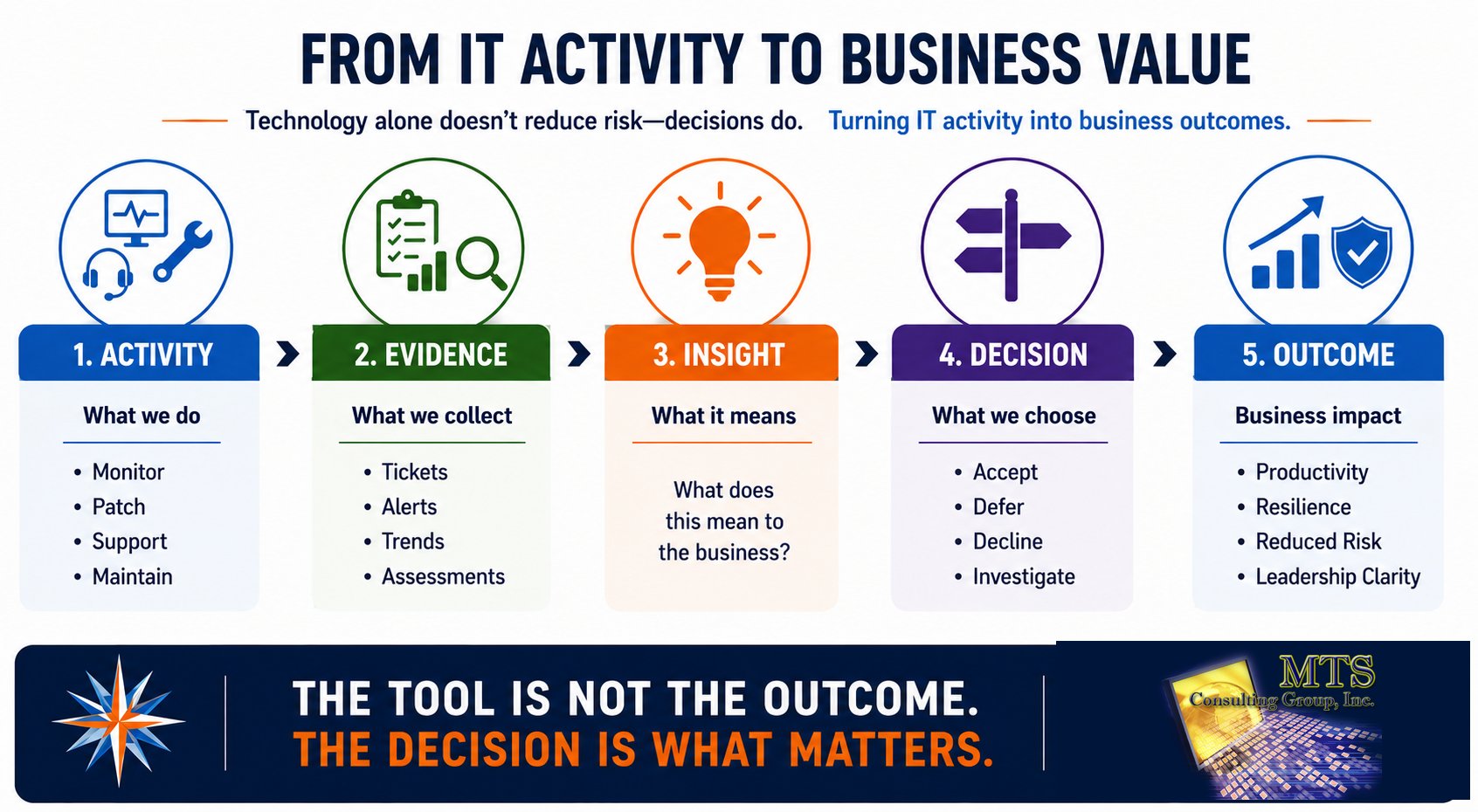
The tool is not the outcome. The decision is what matters.
How Do You Know Whether Managed IT Is Working?
A managed IT relationship should produce measurable improvement over time.
That does not mean every metric must be perfect.
Look for trends.
Examples may include:
- Fewer recurring problems
- Faster problem resolution
- Healthier devices
- Better patch coverage
- Clearer documentation
- Better onboarding and offboarding
- Fewer unmanaged systems
- Better visibility into security gaps
- More predictable lifecycle planning
- Fewer surprise technology decisions
- Better recovery clarity
- More informed leadership reviews
The exact metrics should match the organization.
The important thing is that the relationship produces evidence of improvement.
Good Managed IT Should Reduce Reactive Work Over Time
One of the strongest signs of a healthy managed environment is that the organization gradually becomes more stable.
If the provider is constantly busy because the same problems repeat, activity can look impressive without creating value.
The goal is not maximum ticket volume.
The goal is healthier operations.
At MTS, proactive work exists so the phones ring less because the environment is stronger.
That is a better measure of value.
Frequently Asked Questions
What should a managed IT provider actually do?
At minimum, a managed IT provider should help maintain and support the organization’s technology environment, keep users productive, proactively identify problems, document the environment, and provide clear ownership for technical work.
More advanced relationships may also incorporate security, assessments, strategic planning, Cyber Liability guidance, and executive risk discussions.
Is cybersecurity part of managed IT?
It can be.
The exact scope varies by provider and agreement.
Leadership should ask which security services are actually included instead of assuming “managed IT” automatically includes every cybersecurity responsibility.
What is proactive managed IT?
Proactive managed IT looks for patterns and risks before they become larger problems.
That may involve monitoring, patch management, automation, lifecycle planning, recurring-ticket analysis, security-tool health checks, documentation, and other preventive work.
The goal is to reduce unnecessary reactive support over time.
Should my MSP provide strategic advice?
If strategic guidance is included in the relationship, leadership should expect more than technical reports.
A useful advisor should explain:
- What matters
- Why it matters
- What evidence supports the recommendation
- What can wait
- What decision leadership needs to make
How often should we meet with our managed IT provider?
The right cadence depends on complexity, risk, business change, and the level of service.
Some organizations may need quarterly or more frequent strategic reviews.
Others may require less frequent formal meetings.
The important thing is that the cadence is intentional rather than accidental.
Does managed IT eliminate Cyber Liability?
No.
Managed IT can reduce significant portions of Cyber Liability by improving operations, security, documentation, and visibility.
But leadership still owns business decisions and other responsibilities that extend beyond technology.
Why does MTS care so much about documentation?
Because memory is not a reliable operating system.
Documentation creates evidence, improves continuity, clarifies responsibility, protects organizational knowledge, and makes important decisions visible later.
Documentation is protection.
The MTS Perspective
Managed IT should not be a relationship where the client simply waits for something to break.
It should create a stronger organization.
The technology should become more stable.
The risks should become clearer.
The documentation should improve.
The roadmap should become more predictable.
Leadership should understand the decisions in front of them.
And the provider should be willing to tell the truth when something remains exposed.
The goal is not to make leadership dependent on the IT provider.
The goal is confidence.
Create Clarity Before Action.
Guide Through the Storm.
Teach Before We Act.
See the Whole Risk.
That is what good managed IT should help accomplish.
Your Next Step
At your next IT review, do not begin by asking:
How many tickets did we close?
Ask:
What did you learn about our business from the work you performed?
Then ask:
What problems are repeating?
What risks have you identified?
What has actually been verified?
What should we plan for next?
What decision does leadership need to make?
Those questions turn a service review into a business conversation.
If your current technology relationship cannot answer them, that does not automatically mean you need a new provider.
It may simply mean you need a better conversation.
Start with clarity.
If you need help understanding what managed IT should actually do to reduce your firm’s business risk, MTS’s 26-minute Cyber Liability Assessment is designed to start that conversation.
No technical lecture.
No fear.
No assumption that you need to buy something.
Just a clearer understanding of where the organization may be exposed, what the technology investment should cover, and what leadership should consider next.
Create clarity before action.
Continue Through the Cyber Liability Knowledge Center
Previous Chapter:
Why Can the Cheapest IT Provider Become the Most Expensive Business Decision?
Start Here:
What Is Cyber Liability, and How Is It Different from Cybersecurity?
Next Chapter:
Why Is Meeting the FTC Safeguards Rule Only the Starting Point for an Accounting Firm?
Related chapters:
- What Are the Four Business Risks Every Accounting Firm Should Understand Before Investing in Cybersecurity?
- Why Doesn’t Traditional IT Support Fully Address Cyber Liability?
- How Much Should an Accounting Firm Budget for Managed IT and Cybersecurity in 2026?
- How Does a Cyber Liability Assessment Help Business Leaders Make Better Decisions?
Explore MTS services: