
A nonprofit trying to budget for managed IT, cybersecurity, and Cyber Liability management can use $100 to $400 per user per month as a practical planning range for the service model discussed in this Knowledge Center.
That means a 50-person organization might initially model a monthly investment of approximately $5,000 to $20,000 before considering hardware purchases, major projects, unusual licensing requirements, or other one-time expenses.
The range is intentionally broad.
A nonprofit with straightforward technology, limited regulatory exposure, and strong existing safeguards may require less complexity.
An organization with significant regulatory responsibilities, sensitive information, complex vendors, demanding recovery needs, or evidence of meaningful operational risk may require substantially more.
The important question is not:
“What is the cheapest price per user?”
It is:
“What level of technology support, security, recovery, governance, and risk management does our organization actually need?”

Start With a Planning Range, Not a Quote
Per-user pricing can be useful because it gives leadership a simple place to begin budgeting.
For this chapter, we will use:
$100 to $400 per user per month
as the working planning range.
It is important to understand what that number is and what it is not.
It is:
- a budgeting tool
- a way to estimate scale
- a starting point for leadership discussions
- a way to compare service scope more intelligently
It is not:
- a universal industry average
- a guaranteed price
- proof that two providers offering the same per-user price provide the same service
- a substitute for understanding the organization’s actual risk
Price without scope tells leadership very little.
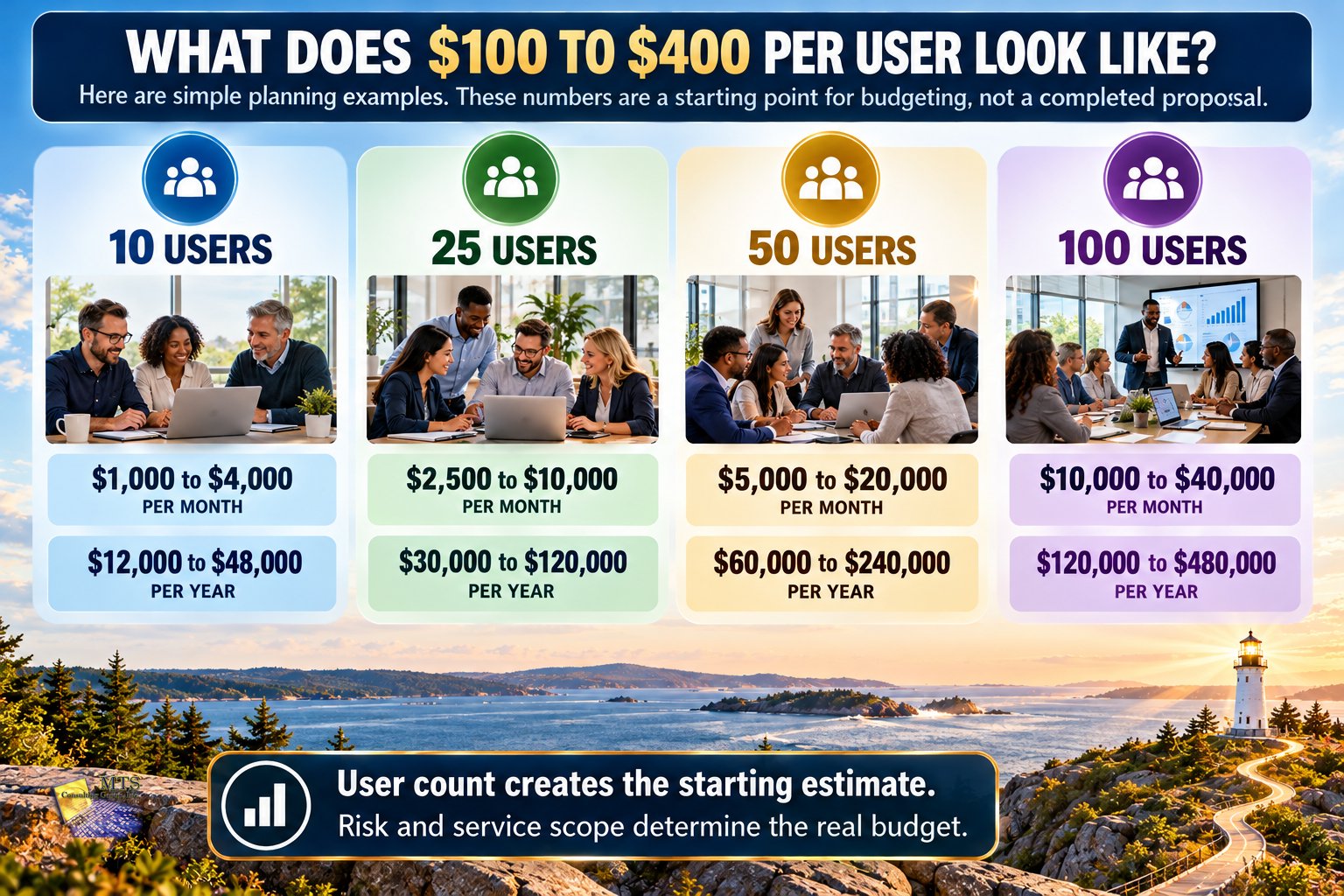
What Does $100 to $400 Per User Mean in Real Dollars?
Here are simple planning examples.
| Number of Users | Monthly Planning Range | Annual Planning Range |
|---|---|---|
| 10 | $1,000 to $4,000 | $12,000 to $48,000 |
| 25 | $2,500 to $10,000 | $30,000 to $120,000 |
| 50 | $5,000 to $20,000 | $60,000 to $240,000 |
| 75 | $7,500 to $30,000 | $90,000 to $360,000 |
| 100 | $10,000 to $40,000 | $120,000 to $480,000 |
These numbers are useful for planning.
They should not be mistaken for a completed proposal.
A nonprofit should still understand what services, protections, responsibilities, and outcomes are included in that investment.
Why Can Two 50-Person Nonprofits Have Very Different Technology Budgets?
Employee count matters.
But it is only one factor.
Imagine two nonprofits each have 50 employees.
Nonprofit A
The organization has:
- one location
- modern computers
- Microsoft 365
- limited sensitive information
- relatively simple applications
- few outside vendors
- tested backups
- limited regulatory complexity
Nonprofit B
The organization has:
- several locations
- aging technology
- remote employees
- sensitive constituent information
- online donations
- multiple cloud applications
- several mission-critical vendors
- complex access requirements
- recovery concerns
- regulatory responsibilities
- known vulnerabilities identified through assessment
Both organizations have 50 users.
Their risk pictures are very different.
Their technology and cybersecurity budgets probably should be different too.
That is why user count starts the conversation.
It should not finish it.
Five Factors That Should Drive the Budget
A useful technology budget should reflect at least five areas.
1. The Technology Environment
How complicated is the environment that needs to be supported?
Consider:
- number of users
- locations
- laptops and desktops
- mobile devices
- servers
- cloud platforms
- line-of-business applications
- internet connections
- remote work
- integrations
- aging systems
A simple environment generally requires less effort to maintain than a fragmented one.
Complexity creates work.
2. The Level of Cybersecurity Protection
Not every organization requires the same security architecture.
Leadership may need to consider:
- multifactor authentication
- endpoint protection
- security monitoring
- email protection
- vulnerability management
- patching
- identity and access management
- employee education
- incident response
- data protection
The question is not how many security products can fit into the budget.
The better question is:
“Which safeguards are appropriate for the risks we actually have?”
3. Recovery and Mission Continuity Expectations
Backup and recovery are not the same thing.
A backup gives the organization a copy of information.
Recovery is the ability to restore systems and get the mission moving again.
Recovery expectations can significantly change cost.
Leadership should ask:
- Which systems are mission-critical?
- How much data could we tolerate losing?
- How long could we operate without the system?
- How often should recovery be tested?
- Do we need redundancy?
- Do employees need another way to work during recovery?
An organization that can tolerate a full day of downtime has different requirements from one that needs an important service restored within a few hours.
The budget should reflect that difference.
4. Regulatory and Legal Complexity
Some nonprofits operate with relatively few formal requirements.
Others maintain information or provide services that create additional responsibilities.
Examples may involve:
- privacy requirements
- payment requirements
- contractual obligations
- insurance requirements
- health-related information
- funding requirements
- employee information
- constituent records
Greater regulatory complexity usually creates additional work around:
- documentation
- controls
- evidence
- policies
- reporting
- access
- vendor management
- monitoring
This is one reason the higher end of a pricing range may be appropriate.
The organization is not paying more simply because a provider created a premium package.
It may require more because leadership carries more responsibility.
5. Current Evidence-Based Operational Risk
This is one of the most important budget drivers.
Suppose two organizations have similar size and regulatory requirements.
An independent review shows that one has:
- current systems
- tested recovery
- appropriate access
- consistent patching
- strong MFA coverage
- limited unresolved vulnerabilities
The other has:
- aging systems
- uncertain recovery
- excessive administrative access
- unresolved vulnerabilities
- unsupported technology
- fragmented vendor responsibility
Those organizations should not automatically receive the same roadmap.
The second organization may require more work because the evidence shows more current risk.
This is why budgeting should follow evidence.
Not fear.
Not assumptions.
Not a generic package.
Educational Example: Same Size, Different Risk
Imagine two 40-person nonprofits.
Both are evaluating managed IT and cybersecurity support.
Organization 1
The environment is modern.
Systems are documented.
MFA is consistently deployed.
Recovery has been tested.
Important vendors are known.
The organization has limited regulatory complexity.
Organization 2
Several computers are approaching end of life.
Recovery testing cannot be confirmed.
Administrative access needs review.
Employees use multiple unapproved cloud tools.
A mission-critical vendor has significant access.
The organization maintains information with additional regulatory responsibilities.
If both organizations are quoted solely on:
40 users × one standard price
leadership may not be comparing the problem that actually needs to be solved.
Organization 2 has more evidence-based work to do.
That difference should affect the roadmap and potentially the investment.
Managed IT Is the Foundation, Not the Whole Budget
It is helpful to understand what different parts of the investment are trying to accomplish.
Managed IT
Managed IT keeps the technology environment functioning.
This may include:
- user support
- device management
- maintenance
- Microsoft 365 administration
- network support
- onboarding and offboarding
- technology lifecycle management
Managed IT creates the operational foundation.
It is important.
But good IT support alone does not answer every Cyber Liability question.
Cybersecurity Adds Protection
Cybersecurity focuses on reducing the likelihood and potential impact of security events.
That may include:
- MFA
- endpoint protection
- monitoring
- vulnerability management
- email security
- patching
- employee education
- access controls
These protections build on the IT foundation.
Recovery Helps the Mission Continue
Backup and recovery capabilities help answer:
“What happens after something goes wrong?”
The budget may need to account for:
- backup
- recovery
- testing
- redundancy
- continuity planning
- recovery documentation
The level of investment should reflect the mission’s tolerance for disruption.
Cyber Liability Management Adds Leadership Context
Technology teams manage technology.
Leadership manages organizational risk.
Cyber Liability management connects the two.
That may involve:
- objective evidence
- risk prioritization
- strategic reviews
- vendor-risk discussions
- regulatory considerations
- documentation
- risk acceptance
- executive reporting
- board-ready communication
- technology roadmaps
- budgeting
This is why simply comparing help desk pricing can create an incomplete picture.
The services may solve very different problems.
Strategic Guidance Matters More as Complexity Increases
A 10-person organization with simple systems may not need the same level of strategic support as a 100-person nonprofit with:
- several locations
- regulated information
- many vendors
- complex recovery requirements
- significant cyber insurance requirements
- major technology projects
- board reporting expectations
As complexity increases, someone must help leadership connect:
Technology
to
Risk
to
Budget
to
Mission
That work should be considered part of the overall investment.
What Might Not Be Included in a Per-User Price?
A per-user monthly price may not include every technology expense.
Depending on the provider and agreement, additional expenses could include:
- new laptops
- desktop computers
- servers
- network hardware
- major cabling projects
- internet service
- specialized software
- major cloud migrations
- office moves
- new location buildouts
- large remediation projects
- compliance consulting
- legal services
- cyber insurance
- unusual software licensing
This is why leadership should ask:
“What is included, what is optional, and what could create additional cost?”
Predictability comes from understanding scope.
Cheap IT Can Become Expensive
Price matters.
Nonprofits should protect every dollar they can.
But the cheapest monthly proposal may not create the lowest total cost.
Consider what happens if a lower-priced service leaves important work outside the agreement.
Leadership may later pay separately for:
- security tools
- recovery
- projects
- strategic guidance
- vendor reviews
- after-hours support
- assessments
- remediation
- reporting
A low base price can still result in a higher total investment.
That does not mean the expensive provider is automatically better.
It means leadership should compare scope before price.
Expensive Does Not Automatically Mean Better Either
The opposite is also true.
A nonprofit should not assume that a higher price proves better protection.
Ask what the additional investment actually provides.
Does it improve:
- availability?
- protection?
- recovery?
- evidence?
- regulatory readiness?
- leadership visibility?
- employee support?
- vendor oversight?
- risk reduction?
If no one can explain what the additional cost accomplishes, leadership should keep asking questions.
The goal is not to spend more.
The goal is to spend intentionally.
For a nonprofit, that means being able to explain how each meaningful technology investment supports the mission, reduces a known risk, or improves the organization’s ability to recover and continue serving.
Seven Questions to Ask When Comparing MSP Pricing
Before comparing proposals, put them side by side and ask:
1. What Is Actually Included?
Do not compare one monthly number with another until the scope is clear.
2. What Security Protections Are Included?
Which safeguards are included in the standard service?
3. What Does Recovery Look Like?
Is backup included?
Is recovery testing included?
What recovery expectations are being supported?
4. What Happens Outside Business Hours?
Understand coverage, escalation, and support expectations.
5. Which Costs Are Separate?
Ask about hardware, projects, licensing, assessments, migrations, and specialized work.
6. How Are Risks and Recommendations Communicated to Leadership?
Will leadership receive a technical report, or will someone explain what matters and why?
7. How Does the Provider Decide What We Actually Need?
This may be the most revealing question.
A good answer should involve your environment, your mission, your evidence, and your risk.
Not simply your employee count.
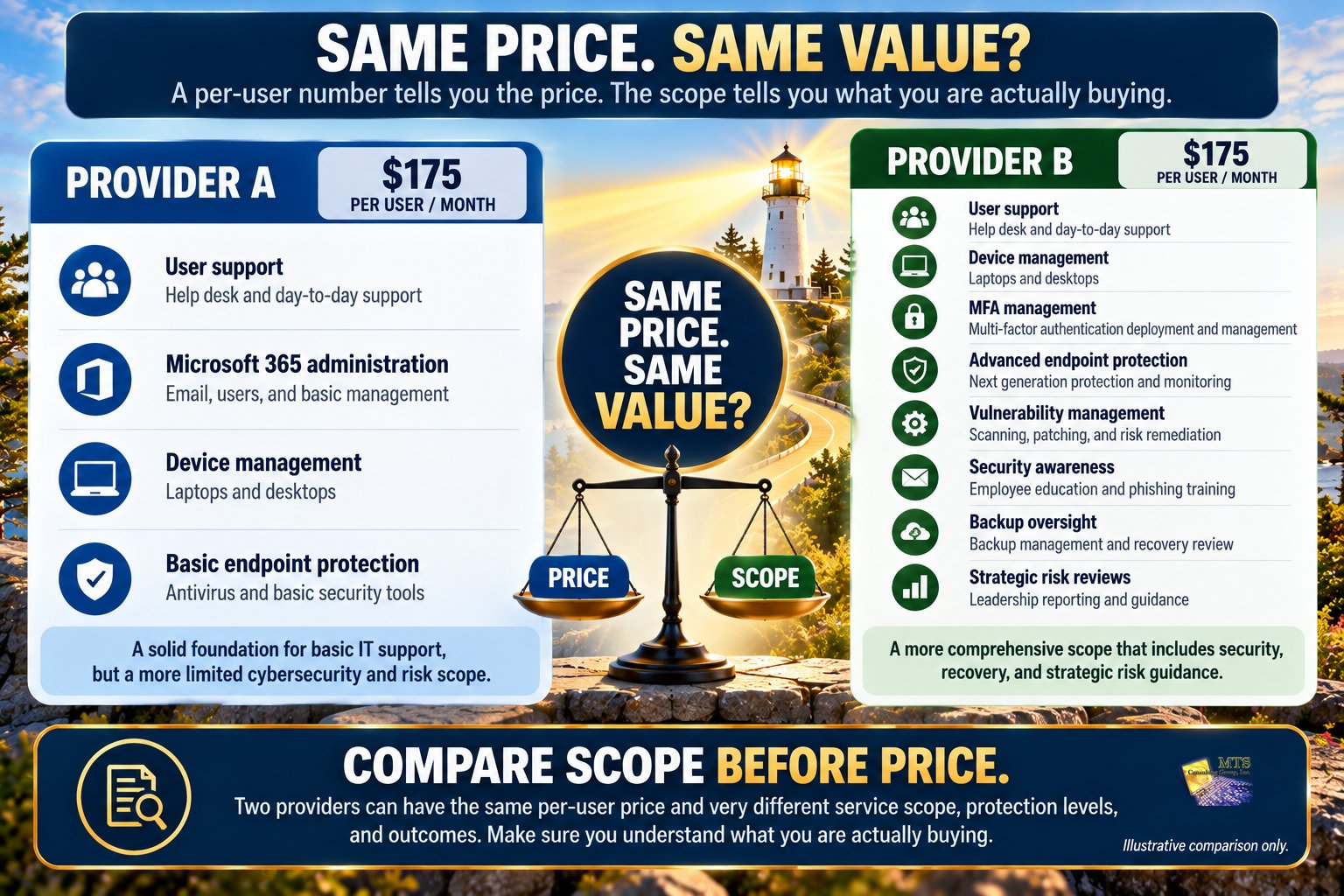
Educational Example: Two Proposals With the Same Price
Imagine a nonprofit receives two proposals.
Both are:
$175 per user per month.
At first glance, they appear equivalent.
Proposal A includes:
- user support
- Microsoft 365 administration
- device management
- basic endpoint protection
Proposal B includes:
- user support
- device management
- MFA management
- advanced endpoint protection
- vulnerability management
- security awareness
- backup oversight
- recovery review
- strategic risk reviews
This does not automatically mean Proposal B is better.
Perhaps the organization already receives some of those services elsewhere.
Perhaps Proposal A fits its needs.
The point is that $175 is not enough information to compare the proposals.
The scope determines the value.
Should a Nonprofit Always Use Per-User Pricing?
Not necessarily.
Providers may use different pricing models.
Examples include:
- per user
- per device
- flat monthly fee
- tiered packages
- combinations of recurring and project pricing
There is no single correct model.
What matters is whether leadership can understand:
- the expected monthly investment
- what changes the price
- what is included
- what is excluded
- how growth affects the budget
- what projects may create additional costs
Predictability is more important than the label on the pricing model.
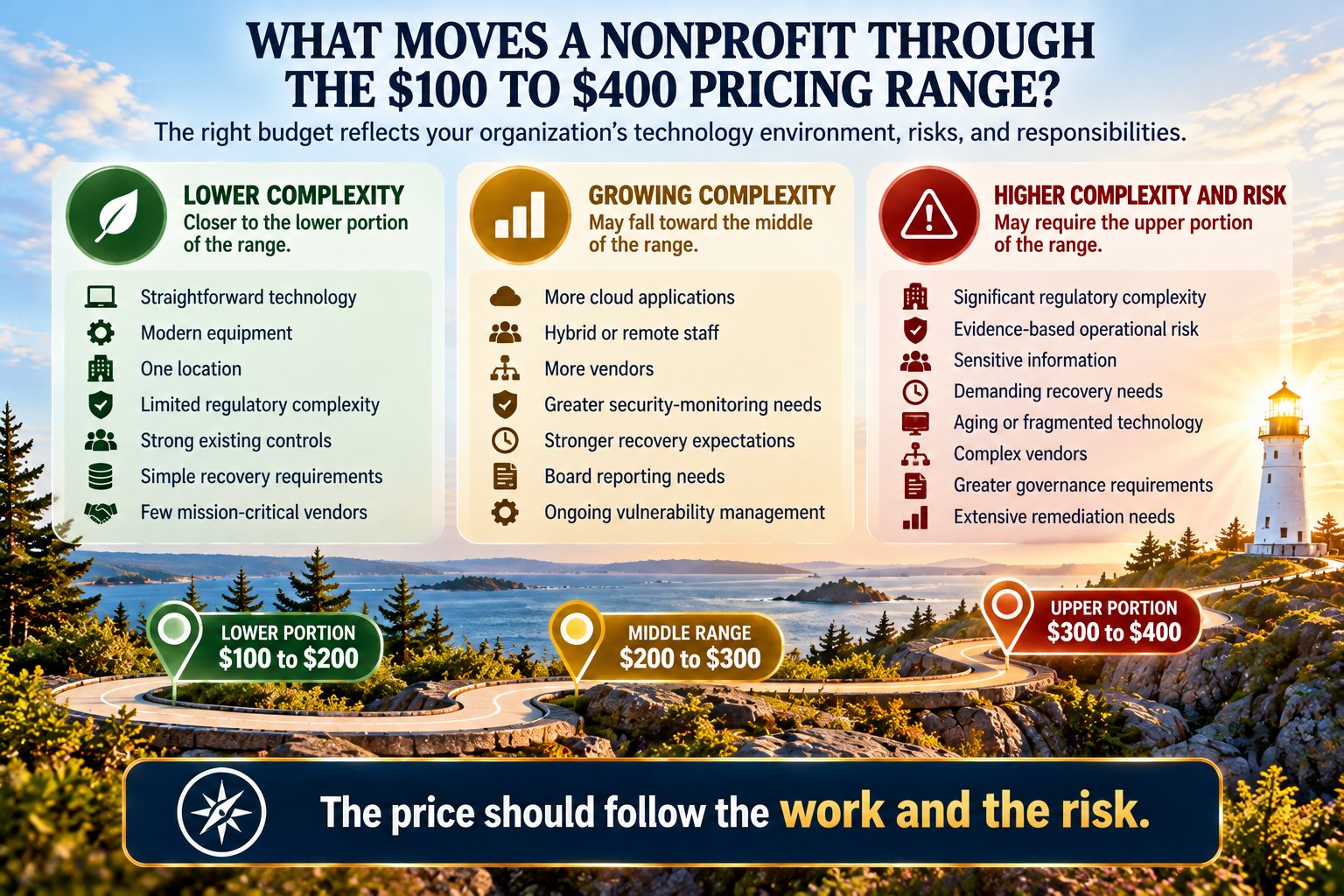
How Should a Nonprofit Think About the $100 to $400 Range?
The range becomes more useful when leadership understands what may move the organization within it.
Toward the Lower End
An organization may be closer to the lower end when it has:
- relatively simple technology
- one location
- modern equipment
- limited regulatory complexity
- well-managed access
- strong existing safeguards
- straightforward recovery expectations
- few mission-critical vendors
- limited strategic complexity
Toward the Middle
Investment may increase when the organization has:
- hybrid or remote staff
- more cloud applications
- multiple important vendors
- greater security-monitoring needs
- stronger recovery expectations
- more employee support requirements
- board reporting needs
- ongoing vulnerability management
Toward the Higher End
The upper portion may become more appropriate when evidence shows:
- significant operational exposure
- complex recovery requirements
- regulated or highly sensitive information
- multiple locations
- substantial vendor risk
- aging or fragmented technology
- extensive remediation needs
- greater executive or board governance requirements
- complex regulatory obligations
The price should follow the work and the risk.
Not the other way around.
Regulatory Complexity Should Affect the Budget for a Reason
A nonprofit should not pay a higher amount simply because someone attaches the word “compliance” to a proposal.
The additional cost should connect to actual responsibility.
For example, greater regulatory complexity may require:
- stronger documentation
- more frequent reviews
- evidence collection
- policy work
- additional safeguards
- more detailed access management
- vendor review
- reporting
- coordination with specialists
Those activities require time and expertise.
That is a legitimate reason for cost to increase.
The organization should be able to understand what additional responsibility the additional investment is addressing.
Evidence-Based Operational Risk Should Affect the Budget Too
The same applies to operational risk.
Suppose an assessment shows that:
- important recovery has not been tested
- several systems are aging
- vulnerabilities remain unresolved
- critical vendor access is poorly understood
- documentation is incomplete
Those are not theoretical reasons to spend more.
They are evidence of work that may need to be done.
A responsible roadmap may therefore require a higher investment for a period of time.
Later, once the environment is more stable, the cost structure may look different.
The important point is that leadership understands why.
Do Not Confuse Recurring Services With Remediation
This distinction matters when budgeting.
There are usually two categories of work.
Recurring Management
The ongoing services required to:
- support users
- maintain systems
- operate safeguards
- monitor the environment
- review risk
- provide guidance
Remediation or Projects
Work required to fix or modernize something that already needs attention.
Examples might include:
- replacing aging infrastructure
- migrating a major system
- redesigning a network
- correcting years of accumulated access problems
- replacing unsupported technology
- completing a major recovery redesign
If these are blended together without explanation, the monthly price can be difficult to understand.
Leadership should know:
What are we paying to operate well going forward?
and
What are we paying to correct where we are today?
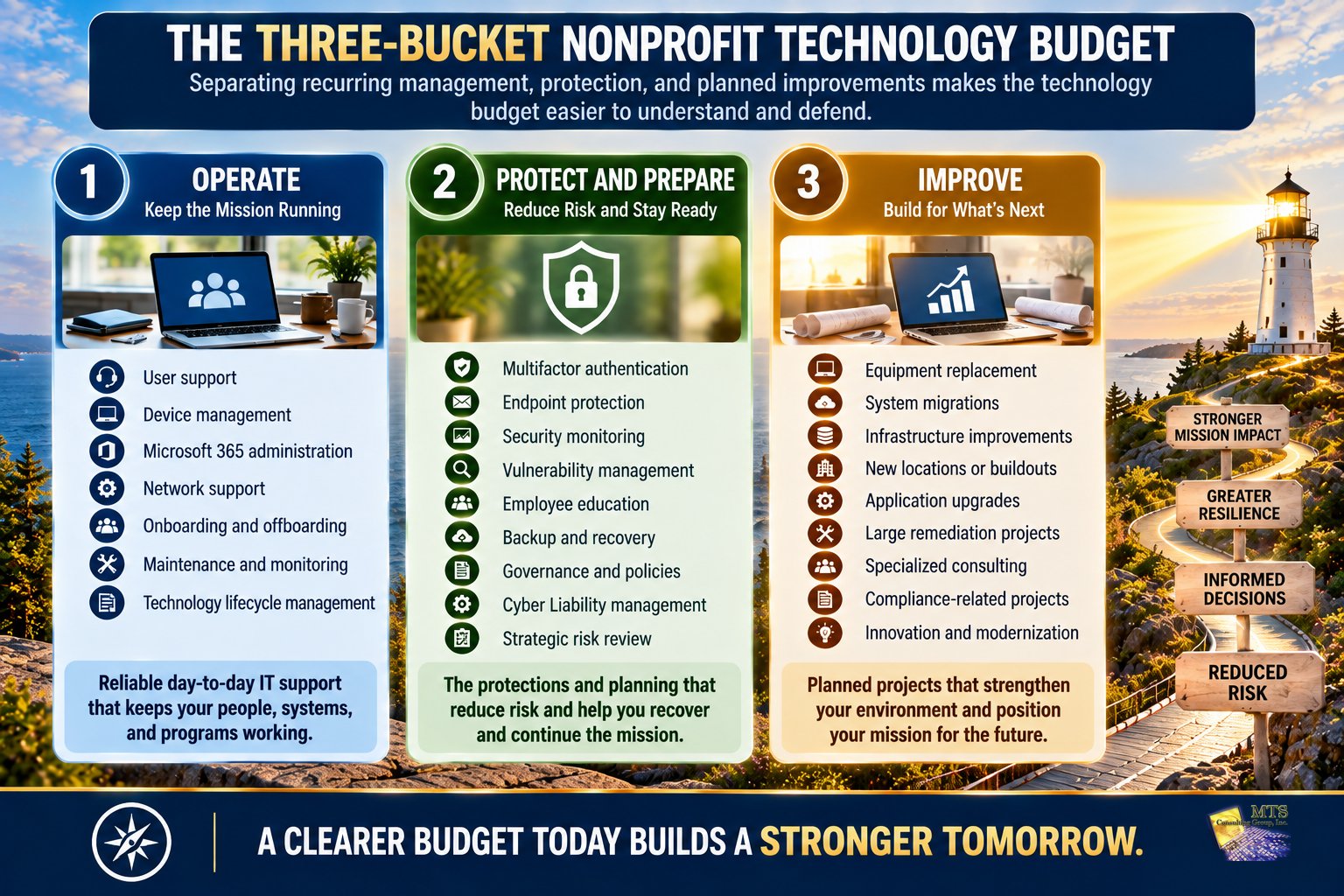
A Simple Three-Bucket Technology Budget
One way to improve planning is to divide technology spending into three buckets.
Bucket 1: Operate
Recurring IT support and technology management.
Examples:
- user support
- device management
- Microsoft 365
- routine administration
- maintenance
Bucket 2: Protect and Prepare
Cybersecurity, recovery, and Cyber Liability management.
Examples:
- MFA
- endpoint protection
- monitoring
- vulnerability management
- backup and recovery
- employee education
- governance
- strategic review
Bucket 3: Improve
Planned projects and modernization.
Examples:
- equipment replacement
- migrations
- new systems
- infrastructure improvements
- major remediation
This makes budgeting easier because leadership can see why money is being spent.
Hardware Should Have Its Own Plan
Computers eventually need to be replaced.
Treating every equipment replacement as an unexpected emergency makes nonprofit budgeting harder.
A planned lifecycle can spread costs more predictably.
For example, if an organization decides that its computers should generally be evaluated for replacement on a 3 to 5-year lifecycle, leadership can begin forecasting those expenses rather than waiting for devices to fail.
The exact lifecycle should reflect:
- equipment age
- warranty status
- operating system support
- application requirements
- employee role
- reliability
- business impact
The larger lesson is simple.
Technology replacement should be planned.
Not discovered during an emergency.
Budget for the Risks You Can Explain
A strong technology budget should survive a simple board question:
“Why are we spending this?”
Leadership should be able to answer in plain language.
For example:
- “This investment supports the systems our employees use every day.”
- “This portion reduces the risk of unauthorized access.”
- “This protects our ability to recover the donor system.”
- “This project replaces equipment that is reaching the end of its supported life.”
- “This work is required because the assessment found a meaningful operational risk.”
That is much more useful than:
“IT says we need it.”
What Should the Board See?
The board probably does not need a breakdown of every software license.
It does need enough information to understand the relationship between:
risk
investment
and
mission
A board-level technology budget discussion might show:
- total recurring managed-service investment
- major cybersecurity and recovery capabilities
- major project investments
- upcoming equipment replacement
- current 3 to 5 priority risks
- regulatory or insurance drivers
- known deferred risk
- important investments planned for the next budget cycle
This creates a stewardship conversation rather than a technical expense review.
A Practical Budget Example
Consider a 50-user nonprofit using the planning range in this chapter.
Its initial managed-service planning range would be:
$5,000 to $20,000 per month
or:
$60,000 to $240,000 per year
That range is intentionally large.
Leadership should narrow it by answering questions about:
- technology complexity
- security protection
- recovery expectations
- regulatory responsibilities
- current evidence-based operational risk
- support requirements
- vendor complexity
- strategic and governance needs
Suppose the organization’s environment is relatively straightforward.
Its realistic planning number might fall toward the lower portion.
Suppose instead that an independent review reveals significant recovery concerns, aging technology, sensitive information, and additional regulatory responsibilities.
Leadership may need to budget toward the higher portion while those needs are addressed.
The number follows the environment.
The Most Useful Budget Question Is Not “How Much Does IT Cost?”
Ask:
“What does our organization need technology to do, protect, recover, and prove?”
That question is more useful because it includes four outcomes.
Operate
Can employees and programs function?
Protect
Are appropriate safeguards in place?
Recover
Can the organization continue or restore operations?
Prove
Can leadership demonstrate what it knows, what it has done, and what risks it has accepted?
Those four outcomes make a technology budget easier to understand.
Five Questions Before Approving the Budget
Before approving a managed IT and cybersecurity budget, leadership can ask:
1. What Are We Paying For?
Can the provider explain the scope clearly?
2. Which Risks Does This Address?
Is the investment connected to actual evidence and organizational needs?
3. What Is Not Included?
What expenses could appear separately?
4. What Happens if We Spend Less?
Which risks or capabilities would change?
5. What Happens if We Spend More?
What additional outcome are we buying?
If no one can answer Questions 4 and 5 clearly, the organization may not yet have enough information to make the decision.
From an IT Price to an Informed Leadership Decision
A good technology budget should move leadership from:
“We think this is what IT costs.”
to:
“We understand what our mission depends on, what risks we are carrying, what protections we need, and why we are choosing to invest here.”
That is an important shift.
The budget is no longer just a technology expense.
It becomes part of the organization’s larger responsibility to protect:
- mission continuity
- sensitive information
- donor and constituent trust
- financial resources
- employees
- regulatory responsibilities
- organizational resilience
The technology budget becomes easier to defend when leadership can explain what the investment is intended to accomplish.
What Should a Nonprofit Leader Take Away From This Chapter?
A useful nonprofit technology budget should not begin with the lowest per-user price.
It should begin with the organization.
For the service model discussed in this Knowledge Center, $100 to $400 per user per month provides a practical starting range.
But the range should narrow based on:
- Technology complexity
- Cybersecurity requirements
- Recovery expectations
- Regulatory complexity
- Current evidence-based operational risk
- Support needs
- Vendor dependencies
- Leadership and governance requirements
The higher end should have a reason.
The lower end should have a reason.
Leadership should be able to explain both.
The objective is not to spend as little as possible.
It is not to spend as much as possible.
It is to make an investment that reasonably reflects the mission, responsibilities, and risks the organization actually carries.
That is responsible stewardship.
Applying the Education: How MTS Approaches Nonprofit Technology Budgeting
MTS uses $100 to $400 per user per month as an approximate planning range for nonprofit managed IT, cybersecurity, and Cyber Liability services.
The final investment depends on the organization’s actual needs.
In particular, the upper portion of the range may be influenced by:
- regulatory-risk complexity
- current evidence-based operational risk
- technology complexity
- security requirements
- recovery expectations
- vendor dependencies
- leadership and reporting needs
MTS does not begin with the assumption that every nonprofit needs the most expensive option.
The process begins with understanding the environment.
Where objective evidence is needed, an Independent Cyber Risk Assessment can provide a clearer picture of current vulnerabilities and existing protections.
That assessment is performed by an independent third-party security company that is not affiliated with MTS.
The roles are intentionally separate.
The independent third party discovers and documents the evidence.
MTS helps leadership understand what the evidence means, how it affects Cyber Liability, what should be prioritized, and what decisions are available.
The nonprofit remains the decision-maker.
From there, MTS can help leadership connect:
evidence
to
risk
to
priorities
to
budget
The objective is not to make the budgeting decision for leadership.
It is to help illuminate the information leadership needs to make that decision with greater clarity.
A Practical Next Step
Before requesting or comparing managed-service proposals, write down these five things:
- How many people need support?
- Which systems does the mission depend on?
- What sensitive information do we maintain?
- How quickly do important systems need to recover?
- What current evidence tells us where our greatest risks are?
Then compare provider scope.
Not just price.
That will make the budgeting conversation much more useful.
Continue Learning
Previous Chapter
Chapter 10: What Should the First 90 Days of Reducing Cyber Liability Look Like for a Nonprofit?
Next Chapter
Chapter 12: How Should a Nonprofit Choose a Managed IT and Cyber Liability Partner?
Price matters.
But after eleven chapters, one thing should be clear:
A technology partner can influence far more than the help desk.
Chapter 12 will bring the Knowledge Center together by helping nonprofit leaders evaluate:
- technical support
- cybersecurity
- recovery
- education
- independent evidence
- vendor management
- strategic guidance
- board communication
- pricing transparency
- accountability
- fit and trust
The final question will be:
How do you choose a partner who helps you understand the risk instead of simply asking you to outsource responsibility?