
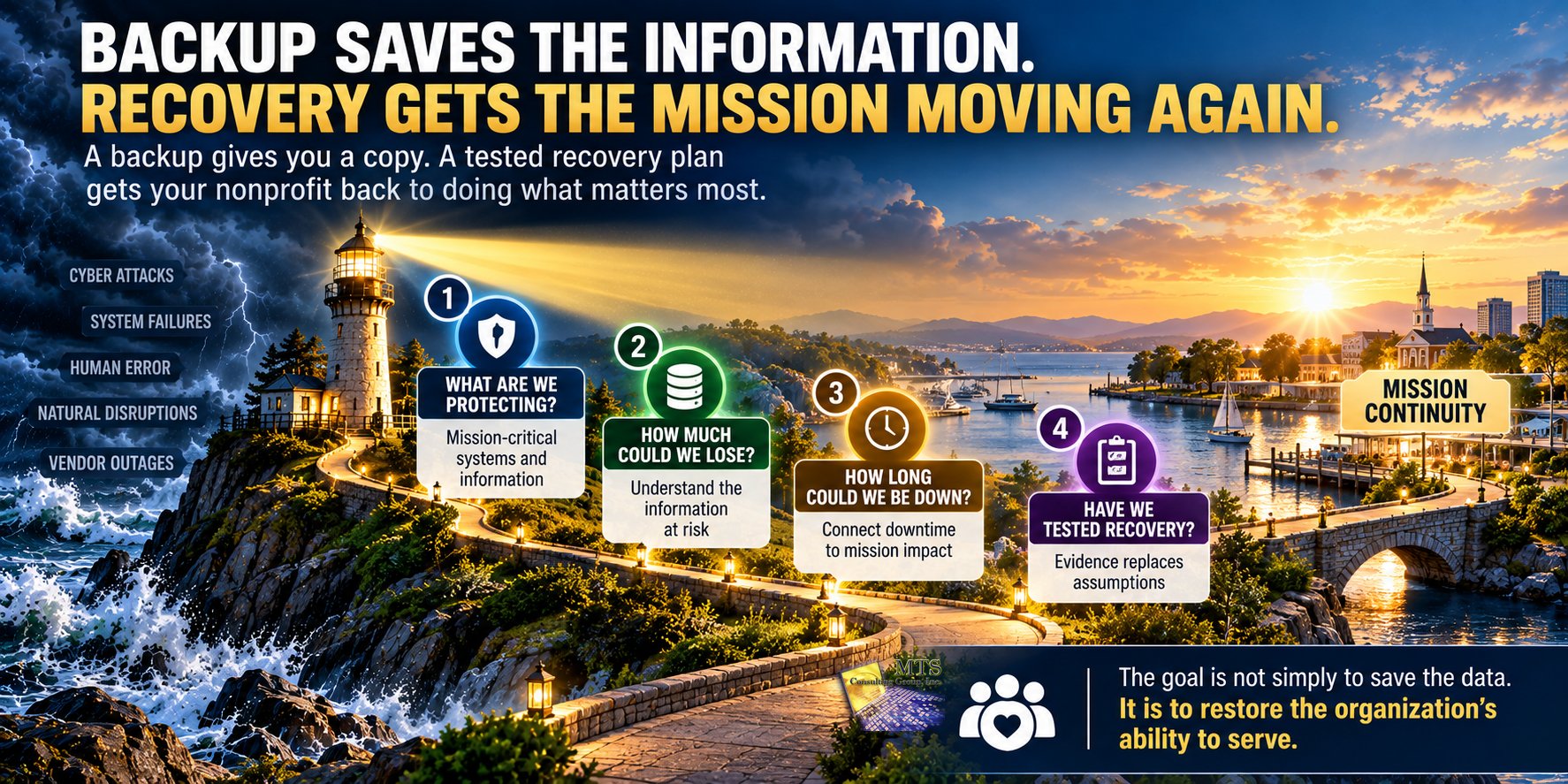
Having a backup does not necessarily mean your nonprofit can recover.
A backup is a copy of information.
Recovery is the organization’s ability to use those copies, restore critical systems, and resume the work the mission depends on.
That difference matters.
A nonprofit can have backups running every day and still be uncertain about four important questions:
- What are we actually backing up?
- Can we successfully restore it?
- How long would recovery take?
- What happens to the mission while we wait?
For nonprofit leaders, backup should not be viewed only as a technology function.
It is part of mission continuity.
The real question is not:
“Do we have backups?”
It is:
“If something stopped working today, could we recover the systems and information our mission depends on within a timeframe we can tolerate?”
Backup and Recovery Are Not the Same Thing
The terms are often used together, which can make them sound like one activity.
They are different.
Backup
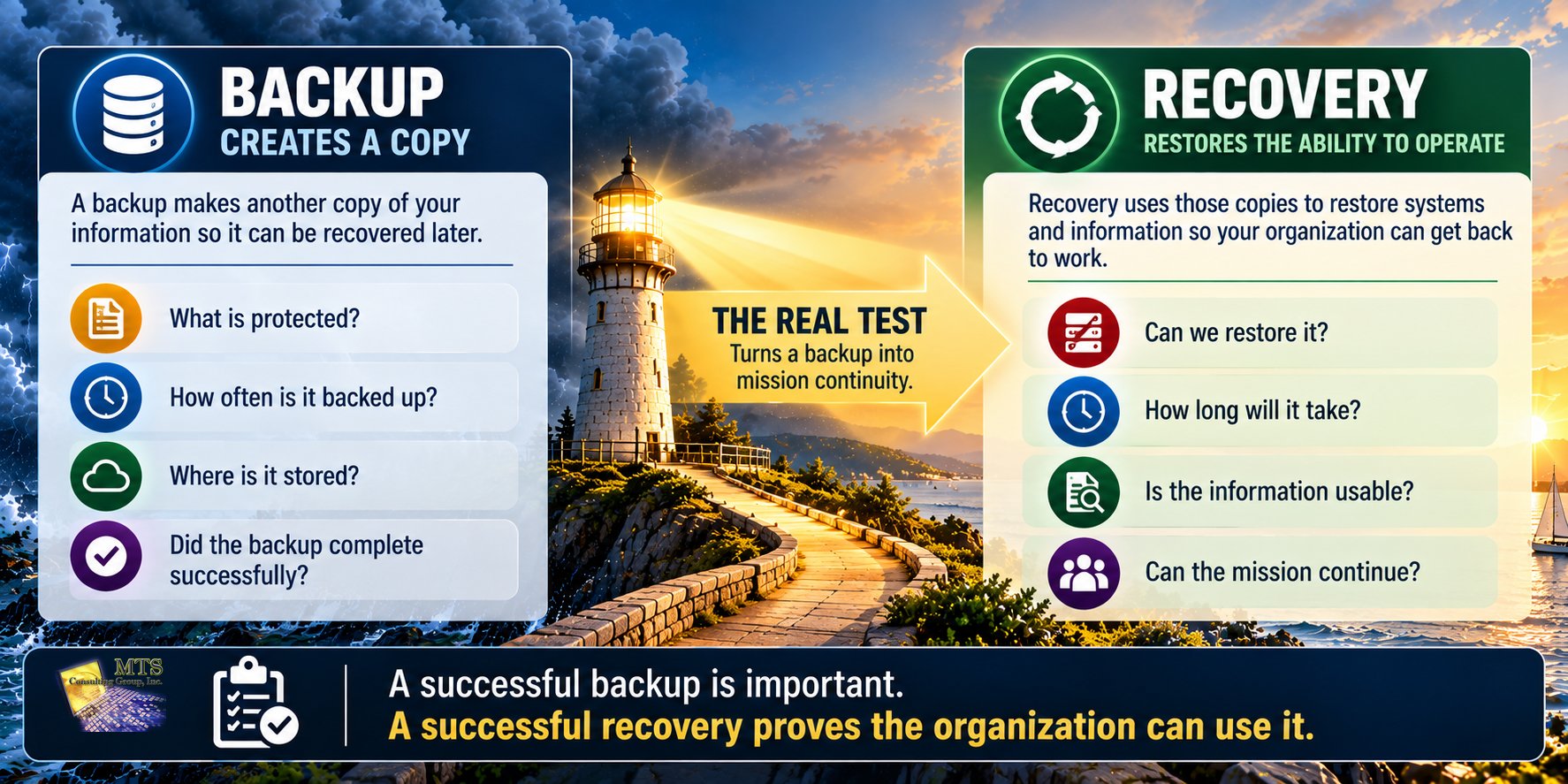
A backup creates another copy of information so it can potentially be recovered later.
Depending on the environment, backups may protect:
- files
- databases
- servers
- cloud information
- applications
- configurations
- business records
Recovery
Recovery is what happens when the organization actually needs that information again.
Recovery asks:
- Can the backup be accessed?
- Is the information usable?
- Can the system be restored?
- How long will restoration take?
- What dependencies have to be restored first?
- Can employees resume their work?
A backup is only valuable when it supports the organization’s ability to recover.
That sounds obvious.
But the distinction is important because many organizations know that backups exist without knowing what recovery would actually look like.
Why This Matters More to a Nonprofit Than the Technology Alone
Technology exists to support the mission.
If the technology stops, the real concern is not the server, cloud application, or backup platform by itself.
The concern is what the interruption prevents the organization from doing.
Depending on the nonprofit, unavailable systems could affect:
- serving constituents
- communicating with clients or members
- processing donations
- accessing donor information
- running payroll
- paying vendors
- coordinating volunteers
- managing programs
- maintaining financial records
- submitting reports
- communicating with funders
- operating an online store
- supporting employees
- accessing important documents
That is why recovery should be discussed in terms leadership can understand.
Instead of:
“How quickly can we restore the server?”
ask:
“How long can this part of our mission operate without the system?”
That is a business question.
Start by Identifying What the Mission Depends On
Not every system has equal importance.
If one application is unavailable for four hours, the organization may barely notice.
If another is unavailable for four hours, programs may stop.
A useful recovery discussion begins by identifying mission-critical activities.
Examples might include:
- accepting online donations
- accessing constituent records
- running payroll
- delivering a client service
- processing financial transactions
- communicating with employees
- maintaining program records
- fulfilling orders
- accessing a case-management platform
Then ask:
“What technology does this activity depend on?”
That might include:
- an application
- a database
- an internet connection
- Microsoft 365
- employee devices
- a server
- a cloud platform
- a vendor
- a payment processor
- authentication services
This connects backup and recovery to the work people actually care about.
Educational Example: Online Donations
Imagine a nonprofit depends heavily on online giving.
The organization may think of its website as the critical technology.
But accepting a donation may depend on several things working together:
- the website
- the donation platform
- a payment processor
- internet connectivity
- donor information
- employee access
- email notifications
- financial systems
If one of those services becomes unavailable, leadership needs to understand the consequence.
Could donations still be accepted another way?
Would the fundraising team know what to do?
How much information could be lost?
How long could the disruption continue before it materially affects a campaign?
Recovery planning becomes much more useful when the organization thinks about the activity being protected, not only the technology.
Four Questions Every Nonprofit Should Ask About Recovery
A practical recovery conversation can begin with four questions.
1. What Are We Backing Up?
This is more complicated than it may first appear.
Organizations often assume that everything is protected because a backup service exists.
Leadership should know whether important information and systems are actually included.
Ask about:
- important files
- databases
- servers
- cloud applications
- collaboration systems
- program information
- financial records
- donor information
- key configurations
The purpose is not for leadership to memorize technical details.
It is to understand whether the information the mission depends on is included in the recovery plan.
2. How Much Could We Lose?
Imagine a system fails at 4:00 p.m.
If the latest usable copy of the information is from midnight the previous night, what happened during those 16 hours?
Could employees recreate the work?
Could donor transactions be reconstructed?
Would program records be missing?
Would financial activity need to be re-entered?
This creates a useful leadership question:
“How much information can we afford to lose?”
The answer may be different for different systems.
A communications archive may tolerate more loss than a system processing financial transactions.
Again, the technology should follow the organizational need.
3. How Long Can We Be Down?
The next question is time.
If a system fails, leadership should have some understanding of how long operations can continue without it.
Ask:
- Could we operate for one hour?
- Four hours?
- One business day?
- Several days?
The answer depends on the activity.
For example:
An internal archive may not create a major problem if it is unavailable for a day.
A system needed for client services may create serious operational issues much sooner.
This helps leadership define what recovery actually needs to accomplish.
4. Have We Tested Recovery?
This may be the most important question.
A backup report can say everything is successful.
That is reassuring.
But it does not necessarily prove the organization can recover.
Testing helps answer:
- Can the information actually be restored?
- Is it usable?
- How long does recovery take?
- Are instructions current?
- Does the right person know what to do?
- Are there missing dependencies?
- Does the actual result match leadership’s expectations?
A backup that has never been tested creates uncertainty.
Testing turns that uncertainty into evidence.
Educational Example: The Green Backup Report
Imagine an Executive Director receives a monthly technology report.
The backup section shows green check marks.
Everything looks healthy.
One day, a major system becomes unavailable.
The technology team begins recovery and learns that restoring the application requires several additional steps that were never tested together.
The backup itself worked.
The recovery process is the problem.
That distinction matters.
A green backup report answered:
“Did the backup process complete?”
It did not necessarily answer:
“Can our organization resume operations within the timeframe leadership expects?”
Those are different questions.
Recovery Testing Is About Learning Before the Emergency
A recovery test is valuable because it creates an opportunity to learn while the organization is not under crisis pressure.
A test may reveal:
- missing information
- unclear responsibilities
- outdated instructions
- longer recovery times than expected
- dependencies no one considered
- applications that require special steps
- vendor coordination issues
- systems that should receive higher priority
None of those discoveries means the organization failed.
That is what testing is for.
It is better to learn during a controlled test than during ransomware, hardware failure, accidental deletion, or another serious disruption.
The point is not to prove that recovery is perfect.
The point is to understand what recovery actually looks like.
What Could Cause a Nonprofit to Need Recovery?
Ransomware receives a great deal of attention, but it is only one reason an organization might need its backups.
Recovery may become necessary after:
- hardware failure
- accidental deletion
- software corruption
- ransomware
- malicious activity
- employee error
- failed upgrades
- cloud-service problems
- facility damage
- stolen equipment
- configuration mistakes
That is another reason backup should not be treated only as ransomware protection.
Recovery is part of broader organizational resiliency.
Recovery Is Primarily an Operational Cyber Liability Issue
Of the four Cyber Liability areas introduced earlier in this Knowledge Center, backup and recovery connect most directly to Operational Risk.
The leadership question is:
“Can we continue carrying out the mission?”
But a serious recovery problem can also affect the other three areas.
Operational
Can we continue carrying out the mission while a system is unavailable?
Reputational
Could an extended disruption damage confidence among donors, constituents, employees, partners, or funders?
Regulatory
Are there requirements about retaining, protecting, recovering, or accessing certain information?
Legal
Could lost information, interrupted services, contracts, privacy responsibilities, insurance obligations, or other circumstances create legal concerns?
A backup problem may start as a technology issue.
Its consequences may extend much further.
Educational Example: A Mission-Critical System Becomes Unavailable
Imagine a nonprofit uses a cloud-based platform to manage services for the people it supports.
Employees depend on the system throughout the day.
The platform becomes unavailable.
Leadership begins asking:
Operational: How long can employees continue serving people without access?
Reputational: Will the disruption affect confidence in the organization?
Regulatory: Are there reporting, documentation, or record-access requirements involved?
Legal: Could unavailable or lost information create contractual, privacy, or other responsibilities?
The recovery question is no longer:
“When will the computer system be back?”
It becomes:
“How do we continue the mission while we recover?”
Recovery Planning Should Include People Too
Recovery is not purely technical.
Someone has to make decisions.
Someone has to communicate.
Someone has to coordinate vendors.
Someone has to determine which operations receive priority.
Leadership should know:
- Who declares that recovery is necessary?
- Who coordinates the response?
- Who communicates with employees?
- Who works with outside technology providers?
- Who determines which system is restored first?
- Who communicates with leadership or the board?
- Who contacts insurance or legal professionals if necessary?
A technically strong backup environment can still struggle if responsibilities are unclear.
That is why recovery planning should include both technology and leadership.
Which Systems Should Be Restored First?
If several systems are unavailable at once, they may not all be restored simultaneously.
Leadership should understand priorities before the crisis.
One way to think about restoration is by asking:
Which system has the greatest effect on our ability to carry out the mission?
For one nonprofit, payroll may come first.
For another, it may be a constituent management system.
For another, it may be communication services.
For another, online donations may be especially important during a major campaign.
There is no universal recovery order.
The organization should determine the order based on its mission.
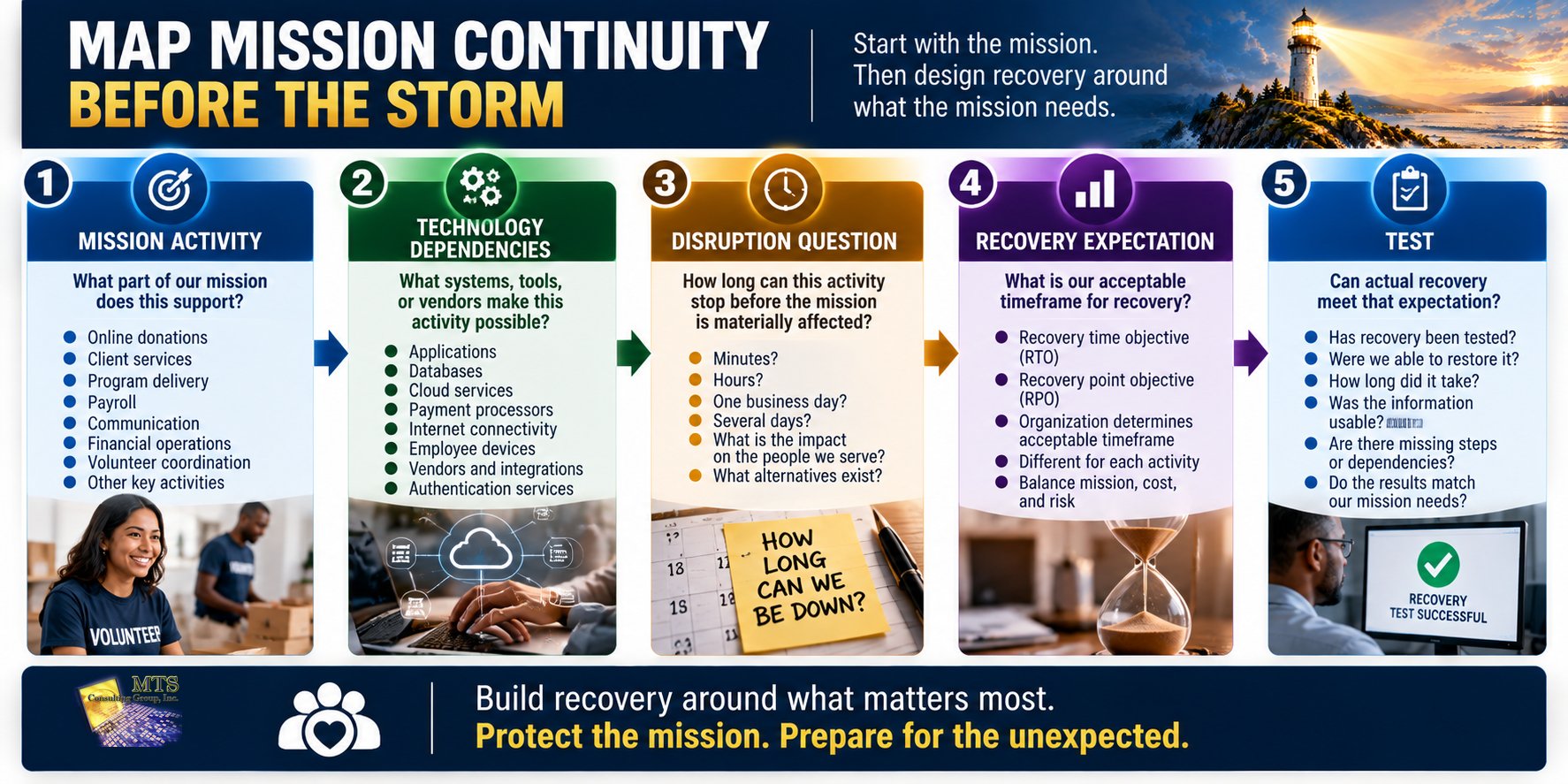
A Simple Mission Recovery Map
A nonprofit leader can begin without creating a complicated disaster-recovery document.
Choose five important activities.
For each one, answer four questions.
| Mission Activity | Technology Dependency | How Long Can We Operate Without It? | Recovery Priority |
|---|---|---|---|
| Example: Online donations | Donation platform, payment processor, internet | [Organization determines] | High / Medium / Low |
| Example: Payroll | Payroll platform, banking access | [Organization determines] | High / Medium / Low |
| Example: Program delivery | Case or program system | [Organization determines] | High / Medium / Low |
| Example: Communication | Email, phones, internet | [Organization determines] | High / Medium / Low |
| Example: Financial operations | Accounting system, records | [Organization determines] | High / Medium / Low |
The exact answers are less important than having the conversation.
Once leadership understands the dependencies, technical professionals can design recovery around what the organization actually needs.
Backups Should Not Create False Confidence
One danger of backup technology is that its presence can create reassurance without understanding.
Leadership hears:
“We have backups.”
The conversation ends.
A better conversation continues:
- What is protected?
- How frequently?
- Where is it stored?
- How do we know it is usable?
- When was recovery last tested?
- How long did the test take?
- Which systems receive priority?
- Does the result match our mission needs?
The goal is not distrust.
It is clarity.
What If Recovery Does Not Meet the Organization’s Needs?
Testing may reveal that recovery takes longer than leadership expected.
That creates a decision.
Possible responses might include:
Improve the Current Process
The organization may be able to improve documentation, configuration, testing, or procedures.
Add Protection
Additional technology or services may reduce recovery time or information loss.
Change the Expectation
Leadership may decide the current recovery capability is reasonable given the cost and impact.
Develop a Temporary Workaround
Some operations may be able to continue manually during recovery.
Accept the Risk
Leadership may understand the gap and consciously choose not to invest in improvement right now.
The correct response depends on the organization.
The important thing is that leadership understands the tradeoff.
Educational Example: Recovery Is Slower Than Expected
Imagine leadership believes an important system can be restored within four hours.
A controlled test shows that actual recovery currently takes closer to a full business day.
That does not automatically mean the organization needs to buy something.
It creates a question:
Can our mission tolerate a full business day without this system?
If the answer is yes, the current recovery capability may be acceptable.
If the answer is no, leadership now has evidence supporting a discussion about improvement.
The test turns a technical assumption into a business decision.
Do Not Let a Deferred Recovery Risk Disappear
Sometimes leadership will decide that a recovery improvement cannot be funded immediately.
That may be reasonable.
But the issue should remain visible.
If a recovery gap is deferred, document:
- what the gap is
- which mission activity could be affected
- current recovery expectations
- existing safeguards
- the decision to defer
- why it was deferred
- any temporary workaround
- when the issue should be reviewed again
A decision can be reasonable today and inappropriate a year from now.
Perhaps the organization grows.
Perhaps a new program depends on the system.
Perhaps insurance requirements change.
Perhaps a vendor changes.
The risk should be reconsidered when the environment changes.
Five Questions for the Executive Director or Board
Nonprofit leaders do not need to understand backup software.
They should be able to ask five questions.
1. What Are Our Most Mission-Critical Systems?
Which systems would cause the greatest disruption if they became unavailable?
2. Are Those Systems Actually Backed Up?
Do we have evidence that the important information is protected?
3. When Did We Last Test Recovery?
Not just backup completion.
Actual recovery.
4. How Long Would Recovery Take?
Does that timeframe match what the mission can tolerate?
5. What Is Our Plan if Recovery Takes Longer?
Can the organization continue operating another way?
Those five questions can create a much stronger conversation than:
“Are backups working?”
The Board Does Not Need Backup Statistics
A board may see reports showing:
- backup success percentages
- storage usage
- backup frequency
- server counts
- job completion status
Those can be useful operational metrics.
But board-level reporting should translate them.
Instead of:
“98.7% of backup jobs succeeded this quarter.”
leadership might report:
“Our mission-critical systems are included in backup, recovery was tested this quarter, and the test showed we can currently restore the most important systems within the timeframe management has established.”
Or:
“Backup jobs are completing successfully, but recovery for two mission-critical systems has not been recently tested. Leadership has scheduled validation for this quarter.”
That gives the board information it can govern.
A Real Nonprofit Lesson: Resiliency Is Built Over Time
An established nonprofit discussed earlier in this Knowledge Center relied on technology for publishing, online activity, organizational information, employees, and mission delivery.
Over time, the organization worked on several areas that contributed to operational resiliency, including:
- modernizing aging technology
- improving endpoint protection
- reviewing encryption
- reducing unnecessary administrative access
- improving governance
- evaluating redundant connectivity
- continuing to review backup and recovery readiness
The important lesson is that resiliency was not created by one backup product.
It developed through a combination of technology modernization, protection, access management, governance, connectivity, and recovery planning.
What This Example Teaches
Mission continuity depends on multiple layers.
Backup and recovery are important layers, but they work best when the broader technology environment is also being managed responsibly.
This is an educational interpretation of the documented experience, not a direct quotation from the client.
Backup Is a Technology Function. Recovery Is a Leadership Concern.
This may be the most important distinction in the chapter.
Technical professionals should manage backup systems.
They should monitor them.
They should troubleshoot failures.
They should perform recovery work.
Leadership has a different responsibility.
Leadership should understand:
- what the mission depends on
- what can be recovered
- how long recovery may take
- what could be lost
- what happens while systems are unavailable
- whether the current capability is acceptable
- what risks the organization is choosing to carry
Those are leadership questions.
That is why recovery belongs in a Cyber Liability conversation.
What Should a Nonprofit Leader Take Away From This Chapter?
Having backups is important.
Knowing that the organization can recover is more important.
A useful recovery conversation should answer:
- What are we protecting?
- How much information could we lose?
- How long could we be down?
- Have we tested recovery?
- Does the result meet the needs of the mission?
The purpose is not perfect availability.
Technology can fail.
Vendors can experience problems.
People can make mistakes.
Cyber incidents can happen.
Preparedness means understanding what happens next.
A backup gives you a copy.
A tested recovery process gives you evidence that the organization has a path back to operating.
For a nonprofit, that path is ultimately about one thing:
getting the mission moving again.
Applying the Education: How MTS Approaches Backup and Recovery Conversations
MTS approaches backup and recovery as a Cyber Liability and business continuity conversation, not simply as a discussion about backup software.
When backup and recovery are relevant to a Strategic Security Briefing, the review can include:
- the current backup method
- known backup gaps
- recovery expectations
- recovery testing status
- business continuity impact
- recommended next steps
- risk acceptance if leadership chooses to defer an improvement
The guiding question is straightforward:
Can the organization recover in a way that matches the needs of the mission?
That begins with evidence.
If recovery has been tested, leadership can use the result to understand what is currently possible.
If recovery has not been validated, that uncertainty becomes part of the Cyber Liability discussion.
MTS then helps leadership understand what the evidence means, what options are available, and what decision needs to be made.
The client remains the decision-maker.
The objective is not to sell a backup product.
It is to help leadership understand whether current recovery capability is appropriate for the organization it is responsible for.
A Practical Next Step
Choose three mission-critical activities this week.
For each one, answer:
- What technology does this activity depend on?
- Is the information backed up?
- When was recovery last tested?
- How long could the activity operate without the system?
- Does our actual recovery capability match that expectation?
If you cannot answer one of those questions, you have identified a useful place to start.
Continue Learning
Previous Chapter
Chapter 6: What Should a Nonprofit Board Ask About Cyber Liability Each Quarter?
Next Chapter
Chapter 8: How Should Nonprofits Manage Cyber Risk From Vendors and Third-Party Systems?
Your nonprofit may outsource software, payment processing, cloud services, payroll, donor management, IT support, and other important functions.
But outsourcing a service does not automatically outsource the consequences when something goes wrong.
Chapter 8 will explore:
- third-party dependencies
- vendor access
- sensitive information
- mission-critical providers
- questions to ask vendors
- contracts and responsibility
- what happens when a vendor fails
- how leadership can prioritize third-party risk without auditing every provider