
Cyber Liability does not come from technology alone.
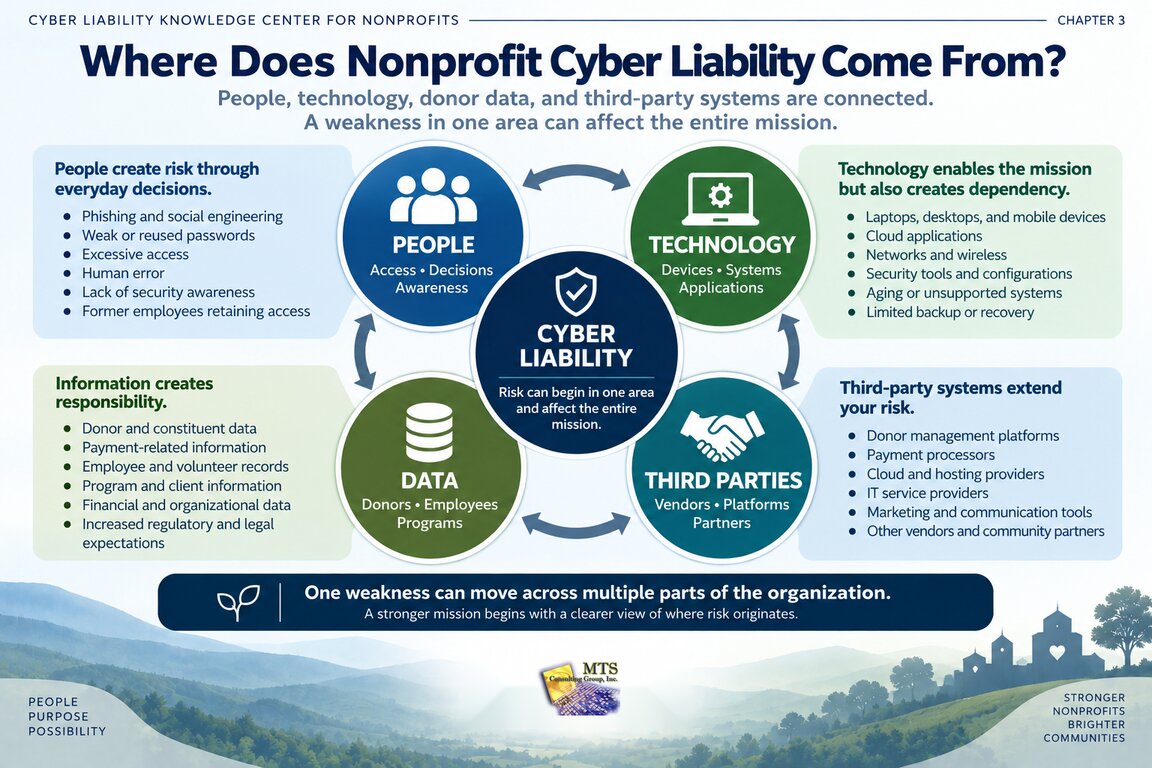
For most nonprofits, risk is distributed across four connected areas: people, technology, sensitive and donor data, and third-party systems.
A weakness in any one of those areas can create Operational, Reputational, Regulatory, or Legal consequences.
That matters because nonprofit leaders often ask a narrow question:
“Is our technology secure?”
A more useful question is:
“Where does our organization depend on people, technology, data, and outside systems—and what happens if one of those dependencies fails?”
That is a better starting point for understanding Cyber Liability.
Cyber Liability Usually Begins With a Dependency
Every nonprofit depends on a combination of people, systems, information, and outside organizations.
Those dependencies make the mission possible.
They also create risk.
A nonprofit may depend on:
- Employees to recognize suspicious email
- Technology to deliver programs
- Donor information to support fundraising
- Cloud platforms to run daily operations
- Payment processors to accept donations
- Vendors to maintain critical applications
- Volunteers to use systems responsibly
- Outside partners to protect shared information
None of those dependencies is automatically a problem.
Risk appears when leadership does not clearly understand:
- What the organization depends on
- What could go wrong
- What safeguards are in place
- Whether those safeguards are actually working
- What the impact would be if they fail
That is why Cyber Liability should be viewed as an organizational issue rather than only a technical one.
1. People: Cyber Liability Often Starts With Everyday Decisions
People are one of the most important parts of an organization’s security environment.
That does not mean employees are “the weakest link.”
That language can create the wrong mindset.
People are also one of the organization’s strongest defenses when they understand:
- What risks to recognize
- What actions are expected
- When to stop and ask questions
- How to report something unusual
- Why security practices matter to the mission
The goal should be education, not blame.
Where People-Related Risk Can Appear
Examples include:
- Phishing emails
- Weak or reused passwords
- Sharing accounts
- Excessive administrative access
- Sending sensitive information to the wrong recipient
- Using unapproved applications
- Failing to report suspicious activity
- Former employees retaining access
- Employees using personal devices or accounts without clear safeguards
- Staff members approving fraudulent payment requests
Many of these begin as ordinary human decisions.
But the consequences can extend across the organization.
Educational Example: A Compromised Employee Account
Imagine an employee receives a convincing email and enters their password into a fraudulent login page.
The immediate issue is an account compromise.
But leadership may need to consider broader questions:
Operational:
Can the attacker interrupt work or access critical systems?
Reputational:
Could donor, employee, or constituent information be exposed?
Regulatory:
Does the information involved create reporting or compliance obligations?
Legal:
Could the event create notification, contractual, insurance, or employment-related responsibilities?
One action by one employee can therefore create multiple types of Cyber Liability.
Security Awareness Should Create Better Decisions, Not Fear
Security awareness training is most useful when employees understand the reason behind the behavior.
For example, employees should not simply be told:
“Do not click suspicious links.”
They should understand:
- Why attackers use email
- What warning signs to look for
- How to verify unusual requests
- Who to contact when uncertain
- Why quickly reporting a mistake is valuable
A healthy security culture makes it easier for someone to say:
“I’m not sure about this. Can someone check it?”
That is much stronger than a culture where employees hide mistakes because they are afraid of being blamed.
This reflects an important operating principle:
Teaching should create confidence, not dependency or fear.
2. Technology: Tools Can Reduce Risk, but They Can Also Create Dependency
Nonprofits rely on increasingly complex technology environments.
A typical organization may use:
- Laptops and desktops
- Microsoft 365 or Google Workspace
- Cloud applications
- Firewalls
- Wireless networks
- Servers
- Mobile devices
- Donor management platforms
- Accounting systems
- Payment applications
- Websites
- Collaboration tools
- Backup systems
- Security applications
Each technology can help the organization operate more effectively.
Each also creates a dependency.
The leadership question is not whether technology should be used.
It is:
“Do we understand which technologies are critical to our mission and what happens when they become unavailable, outdated, or compromised?”
Aging Technology Can Become Business Risk
Older technology is not automatically unsafe.
But unsupported operating systems, aging hardware, outdated firmware, and inconsistent replacement cycles can create increasing uncertainty.
An organization may experience:
- More frequent failures
- Increased downtime
- Reduced compatibility
- Difficulty applying security updates
- Limited visibility
- Higher support costs
- Greater difficulty meeting insurance or compliance expectations
A documented nonprofit experience in the MTS source material shows this clearly.
An established nonprofit moved away from older systems, eliminated Windows 7, continued its migration to Windows 11, and established a formal 3–5 year hardware lifecycle. Its technology modernization work also included endpoint protection, firewall improvements, asset tracking, and firmware review.
The educational lesson is not simply:
“Replace old computers.”
The lesson is:
Technology lifecycle decisions are also risk-management decisions.
Educational Example: The Five-Year Laptop
Consider a nonprofit employee whose laptop is five years old.
It still turns on.
Applications still open.
From a basic operational viewpoint, it may appear acceptable.
But leadership might need to ask:
- Is the operating system still fully supported?
- Can required security controls run properly?
- Is the hardware reliable enough for the employee’s role?
- How disruptive would failure be?
- Does replacement align with the organization’s documented lifecycle?
- Would keeping the device create insurance or compliance concerns?
The answer should come from evidence rather than the device’s age alone.
3. Donor and Sensitive Data: Information Creates Responsibility
Nonprofits often maintain information because they need it to carry out their mission.
That information may include:
- Donor names
- Contact information
- Donation history
- Payment-related information
- Employee records
- Volunteer information
- Financial records
- Constituent information
- Program records
- Health-related information
- Ministry or membership information
- Credentials
- Documents shared with funders or partners
The organization may need this information.
But keeping information creates responsibility.
The more sensitive the information, the more important it becomes to understand:
- Where it is stored
- Who can access it
- Why they need access
- How long the organization retains it
- How it is protected
- Vendors also have access
- What would happen if it were exposed
Is is important to recognize that nonprofit Cyber Liability can be spread across people, technology, donor data, and third-party systems.
Donor Data Is More Than a Technical Asset
Donor information supports fundraising.
But it is also connected to trust.
A donor may provide:
- A name
- Email address
- Mailing address
- Donation amount
- Giving history
- Payment details
- Communication preferences
Some of that information may be held directly by the nonprofit.
Some may be stored by outside platforms.
Some may move between multiple systems.
That means donor data can create several kinds of Cyber Liability at once.
Operational
Could the organization continue fundraising if donor systems became unavailable?
Reputational
Would donors lose confidence if their information were exposed?
Regulatory
Are there privacy, payment, contractual, or other requirements that apply?
Legal
Could exposure create notification or other legal responsibilities?
That is why donor data should not be viewed only as “information in a database.”
It is part of the relationship between the organization and the people who support its mission.
Educational Example: Too Much Access
Imagine a nonprofit where nearly every employee has access to the donor management platform.
That may have developed gradually.
Perhaps it was easier to give broad access than create individual roles.
But leadership should ask:
- Does everyone need the same access?
- Who can export donor information?
- Who can change records?
- Who can view payment-related information?
- Are former employees removed promptly?
- Are administrative accounts separately controlled?
The risk is not simply that an employee might do something wrong.
Broad access also increases the number of accounts that could expose sensitive information if compromised.
4. Third-Party Systems: Your Risk Does Not Stop at Your Network
Nonprofits rarely operate entirely on systems they own.
Outside providers may support:
- Donor management
- Payment processing
- Cloud hosting
- Accounting
- Payroll
- Benefits
- Human resources
- Websites
- E-commerce
- Marketing
- File sharing
- Case management
- Communications
- Cybersecurity
- IT support
Those relationships are often necessary.
But they create a critical Cyber Liability principle:
Your organization can outsource a service. It cannot automatically outsource the consequences if that service fails.
That is why third-party systems deserve leadership attention.
What Should Leaders Know About Important Vendors?
For a mission-critical vendor, nonprofit leaders should be able to answer basic questions such as:
- What service does the vendor provide?
- What information does the vendor maintain?
- What systems can the vendor access?
- Who owns the relationship?
- What happens if the service becomes unavailable?
- How is access removed when it is no longer needed?
- What contractual responsibilities exist?
- What security expectations apply?
- What alternatives exist if the relationship changes?
The goal is not to perform a technical audit of every vendor.
The goal is to understand which vendors create meaningful organizational dependencies.
Educational Example: The Donor Platform Goes Offline
Imagine a nonprofit approaching its largest annual fundraising campaign.
Its third-party donor platform becomes unavailable.
Nothing inside the nonprofit’s own network has failed.
But the organization may still experience:
- Inability to accept donations
- Delayed donor communication
- Staff disruption
- Lost fundraising momentum
- Questions from leadership or the board
This is a third-party technology problem with direct operational consequences.
If the outage involved a data-security event, reputational, regulatory, and legal concerns could also enter the conversation.
Third-Party Risk Is Also an Access Problem
A vendor does not need to store donor data to create risk.
It may have access to:
- Administrator accounts
- Servers
- Cloud platforms
- Network devices
- Financial systems
- Employee information
- Sensitive files
Leadership should understand the difference between:
A vendor we use
and
A vendor that can access our organization.
Those are not always the same thing.
One simple review question is:
“If this vendor’s account were compromised tomorrow, what could someone reach inside our organization?”
That question often creates more clarity than asking whether the vendor is “secure.”
The Four Sources of Risk Are Connected
People, technology, data, and third-party systems should not be evaluated in isolation.
They interact.
Consider this example:
A fundraising employee uses a donor platform hosted by an outside provider.
That single activity involves:
People
The employee and their security habits.
Technology
The laptop, browser, email, MFA, and network connection.
Data
Donor and fundraising information.
Third-party system
The donor management platform.
A weakness in one area may affect all the others.
For example:
An employee password is stolen.
The attacker uses it to access the donor platform.
Sensitive information is exposed.
Leadership must work with the vendor to understand what happened.
What began with a person can quickly become a technology, data, vendor, reputation, regulatory, and legal issue.
This is why Cyber Liability requires a whole-risk perspective.
A Simple Dependency Map for Nonprofit Leaders
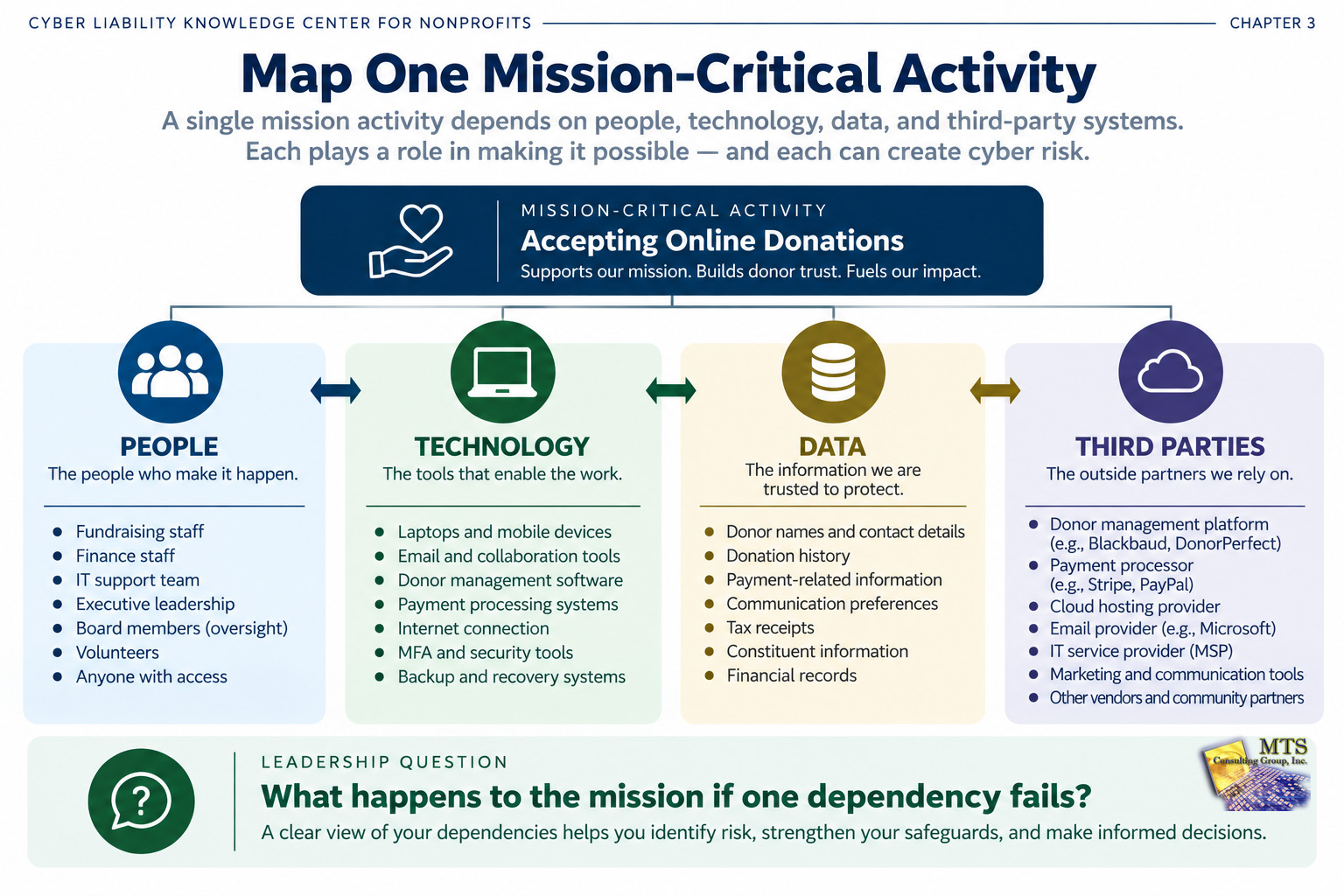
One of the easiest ways to make Cyber Liability more understandable is to map a critical activity.
Choose one important function.
For example:
Accepting online donations
Then identify the dependencies.
People
Who manages the process?
Who has access?
Technology
Which devices, accounts, networks, and applications are required?
Data
What information is collected or stored?
Third Parties
Which outside providers support the process?
Then ask one final question:
“What happens to the mission if one of these dependencies fails?”
You can repeat this exercise for:
- Payroll
- Program delivery
- Constituent services
- Fundraising
- Financial reporting
- Employee onboarding
- Volunteer management
- Communications
- E-commerce
- Remote work
This is not a technical audit.
It is a leadership exercise.
A Real Nonprofit Experience: Multiple Dependencies in One Environment
The following example is intentionally anonymized.
An established nonprofit organization depended on a combination of:
- Employees
- Publishing systems
- E-commerce
- Online payments
- Customer and ministry information
- End-user devices
- Outside technology providers
- Cloud and vendor-supported systems
Its Cyber Liability management therefore could not be reduced to one firewall or one security product.
Documented work included:
- Eliminating Windows 7
- Continuing Windows 11 migration
- Creating a 3–5 year hardware lifecycle
- Deploying next-generation endpoint protection
- Improving password management
- Increasing employee security awareness
- Reviewing encryption
- Reducing unnecessary administrative access
- Using recurring vulnerability assessments
- Evaluating server and cloud decisions
- Improving internet resiliency
The organization also relied on platforms and outside support relationships as part of normal business operations.
What This Example Teaches
The most useful lesson is that Cyber Liability existed across the entire environment.
- People needed education and appropriate access.
- Technology needed lifecycle management and protection.
- Information needed safeguards and governance.
- Outside platforms and providers created dependencies that leadership needed to understand.
No single improvement eliminated the risk.
The organization became better prepared by improving multiple connected areas over time.
That conclusion is strongly supported by the documented client experience, but it is an educational interpretation rather than a direct client quotation.
Five Questions Leaders Can Ask About Their Own Environment
You do not need to map every system today.
Start with five questions.
1. Which people have access to our most important systems and information?
Look for unnecessary access, shared accounts, administrative privileges, and former users.
2. Which technologies would cause the greatest disruption if they failed?
Focus on mission impact rather than the cost of the device or system.
3. What information would create the greatest concern if it were lost, exposed, or unavailable?
Consider donor, employee, financial, constituent, program, and confidential organizational data.
4. Which vendors have access to important systems or information?
Include cloud providers, payment processors, application vendors, IT providers, consultants, and other outside parties.
5. What evidence tells us our safeguards are actually working?
Policies and tools are useful. Evidence provides greater confidence.
Do Not Try to Fix Everything at Once
Once leaders begin looking at all four areas, the list of possible improvements can become long.
That does not mean everything is urgent.
The purpose of Cyber Liability management is not to create a larger shopping list.
It is to create better decisions.
For each issue, leadership can ask:
- What is the actual risk?
- What evidence supports that conclusion?
- What part of the mission could be affected?
- What safeguards already exist?
- What additional action is reasonable?
- What would it cost?
- What happens if we defer it?
- Who owns the decision?
This creates clarity before action.
What Should a Nonprofit Leader Take Away From This Chapter?
Cyber Liability is rarely located in one place.
It is usually spread across four connected areas:
People
The decisions, access, behavior, and awareness of employees, volunteers, and leadership.
Technology
The systems, devices, applications, networks, and safeguards the organization depends on.
Data
The donor, employee, constituent, financial, program, and other sensitive information the organization has a responsibility to protect.
Third-Party Systems
The vendors, platforms, service providers, and partners the organization depends on or allows into its environment.
A strong Cyber Liability conversation asks:
What do we depend on?
What evidence tells us how well it is protected?
What could happen if it fails?
What should leadership do about it?
Those questions are far more useful than simply asking whether the organization is “secure.”
Applying the Education: How MTS Uses This Four-Source View
At MTS, this educational framework is used to help leaders see Cyber Liability across the whole organization rather than focusing only on technology products.
The Nonprofit BrandScript MTS recognizes describes nonprofit Cyber Liability as being spread across people, technology, donor data, and third-party systems.
The starting principle is:
Evidence before opinion.
When objective evidence is needed, the Independent Cyber Risk Assessment referenced recommended by MTS is performed by an independent third-party security company that is not affiliated with MTS.
The purpose of the independent evidence is to help reveal vulnerabilities and evaluate existing protections objectively.
MTS then helps leadership understand:
- What the evidence means
- Where the risk exists
- Which parts of Cyber Liability may be affected
- What should be prioritized
- What decisions are available
The independent third party discovers and documents evidence.
MTS educates, interprets, guides, and helps prioritize.
The client remains the responsible decision-maker.
Continue Learning
Previous Chapter
What Are the Four Cyber Liability Risks Every Nonprofit Leader Should Understand?
Next Chapter
Chapter 4: How Does an Independent Cyber Risk Assessment Help Nonprofit Leaders Make Better Decisions?
Chapter 4 will explain:
- What an independent assessment is
- Why independence matters
- What evidence leaders should expect
- What an assessment should and should not tell you
- How to turn findings into priorities
- How nonprofit leaders can use the results without becoming cybersecurity experts