
Artificial intelligence can help nonprofit organizations write, research, summarize, analyze, organize, and communicate more efficiently.
The bigger leadership question is not whether employees will use AI.
It is whether the organization understands what information employees are putting into AI tools, which tools they are using, and what rules should guide that use.
For nonprofit leaders, a practical AI governance conversation can begin with five questions:
- What AI tools are people already using?
- What information should never be entered without approval?
- Which AI tools are approved for organizational use?
- Who is responsible for reviewing AI-related risk?
- How will we know whether our AI practices still make sense six months from now?
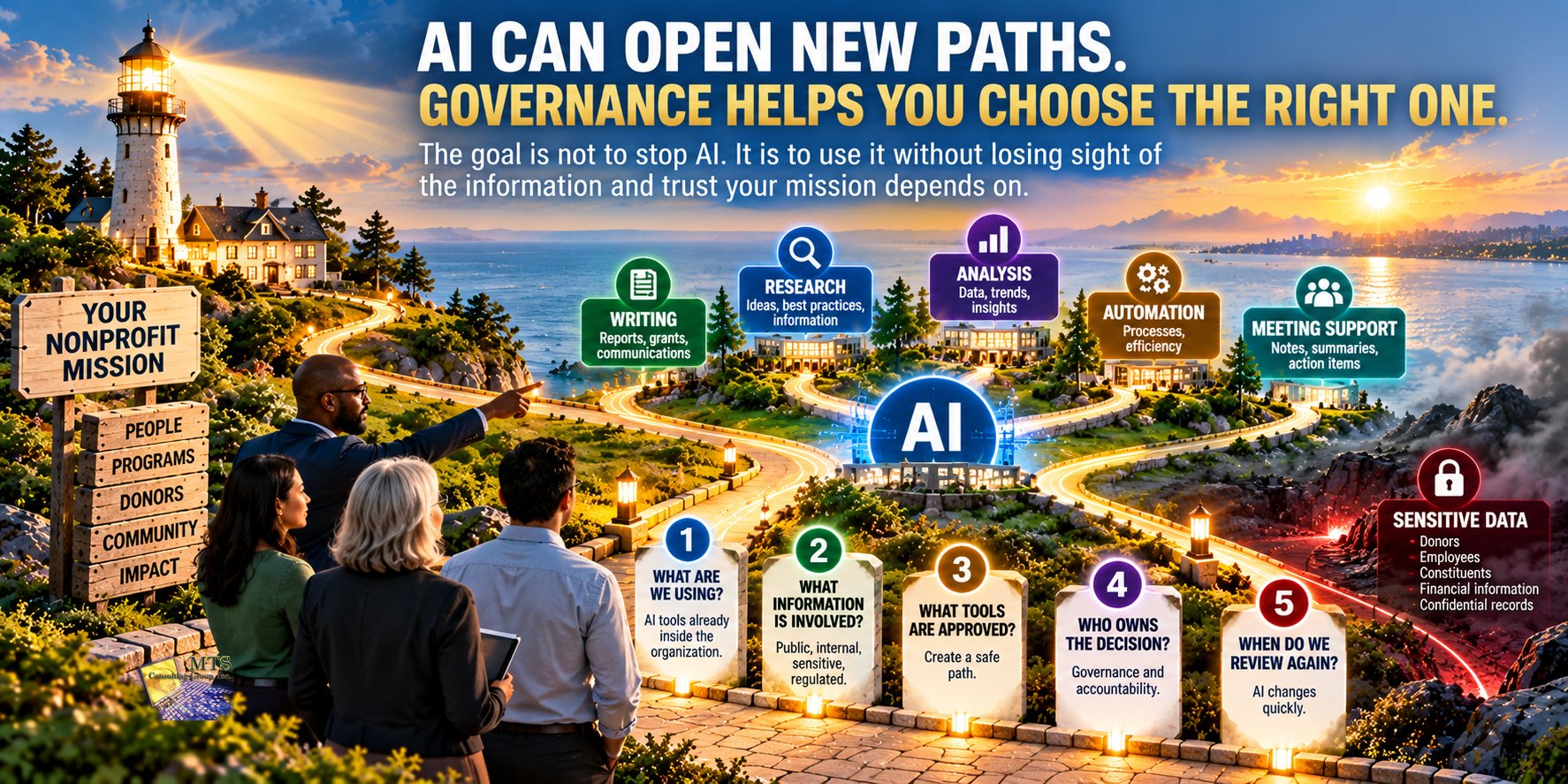
AI does not need to be treated as either completely safe or completely dangerous.
It should be managed like any other technology that can affect sensitive information, third-party risk, organizational reputation, and leadership responsibility.
AI May Already Be Inside Your Organization
Leadership may think the organization is still deciding whether to adopt AI.
Employees may already be using it.
Someone may be using AI to:
- draft fundraising emails
- summarize meeting notes
- improve grant language
- create social media content
- organize a spreadsheet
- rewrite a policy
- prepare a presentation
- research a topic
- create volunteer communications
- analyze a document
- draft an employee announcement
In many cases, the employee is simply trying to work more efficiently.
The problem is not automatically the use of AI.
The risk begins when no one has answered basic questions about what tools are being used and what information is appropriate to share with them.
That is why AI governance should begin with visibility rather than prohibition.
The First Question Is Not “Should We Use AI?”
For many organizations, that question may already be outdated.
A better question is:
“How are people using AI today, and do we understand the risk?”
That changes the conversation.
Instead of starting with:
“AI is banned.”
or:
“AI is the future, so everyone should use it.”
leadership can start with:
- What tools are employees using?
- What are they using them for?
- What information is being entered?
- Are organizational accounts being used?
- Are employees using personal accounts?
- Does the organization have any guidance?
- Who should employees ask when they are unsure?
That creates a much more useful starting point.
Why Sensitive Information Changes the AI Conversation
The biggest concern is often not the prompt itself.
It is the information included in the prompt.
Nonprofits may maintain sensitive information involving:
- donors
- employees
- volunteers
- constituents
- members
- clients
- financial activity
- programs
- health-related information
- credentials
- confidential board matters
- contracts
- legal matters
- regulated information
An employee may not think of copying information into an AI tool as “sharing data with another system.”
They may simply think:
“I want help summarizing this.”
That is why education matters.
Employees need to understand that entering organizational information into an outside AI platform is a data-handling decision.
Educational Example: The Donor Spreadsheet
Imagine a fundraising employee has a spreadsheet containing donor names, contact information, giving history, and campaign notes.
The employee wants help identifying patterns and drafting donor communications.
They upload the spreadsheet to an AI tool using a personal account.
The employee is not trying to create a security problem.
They are trying to save time.
But leadership now has several questions:
- Was that AI platform approved?
- Was the donor information appropriate to upload?
- What information did the employee actually share?
- Does the organization understand how the platform handles that information?
- Could privacy, contractual, or other obligations be involved?
- Should the employee have used a sanitized version of the data instead?
The issue is not simply:
“Someone used AI.”
The issue is:
“Sensitive organizational information was shared with a third-party system without a clearly understood process.”
AI Governance Should Start With the Information, Not the Tool
It is tempting to make an approved list of AI applications and consider the problem solved.
That can help.
But the more important question is:
“What kind of information are we comfortable allowing into any outside AI system?”
A nonprofit can begin by grouping information into simple categories.
Public Information
Information already intended for public use.
Examples may include:
- website content
- public program descriptions
- published annual reports
- public event information
- approved marketing material
This is usually the easiest category for leadership to evaluate.
Internal Information
Information used inside the organization but not generally considered highly sensitive.
Examples might include:
- internal drafts
- general procedures
- non-sensitive meeting notes
- planning documents
Leadership should still decide which tools are appropriate.
Sensitive Information
Information that could create meaningful harm if mishandled.
Examples may include:
- donor records
- employee information
- constituent information
- financial records
- confidential contracts
- board discussions
- credentials
- private program data
This category deserves much more care.
Regulated or Highly Sensitive Information
Some organizations maintain information subject to additional legal, contractual, insurance, or regulatory requirements.
That information should not be entered into AI systems casually.
The exact categories will vary by organization.
The value is creating a shared language employees can actually understand.
A Simple Rule Employees Can Remember
Long AI policies can be difficult to apply in the middle of a busy workday.
Employees need a simple decision point.
One useful rule is:
If you would hesitate to send the information to an unknown outside company, stop before putting it into an AI tool.
That is not a complete governance program.
But it can help employees recognize when they should ask before acting.
Another useful question is:
“Does the AI need the real information to help me?”
Often, it does not.
Instead of using:
“Write a thank-you letter to Mary Smith, who donated $10,000 and lives at…”
the employee may be able to ask:
“Draft a warm thank-you letter for a major donor who supported our education program.”
The employee can insert the appropriate details afterward.
The AI still provides value.
The sensitive information never had to leave the organization.
Educational Example: Drafting a Grant Application
Imagine a program director wants help improving a grant application.
The employee could paste the entire working document into an AI system.
But the draft may contain:
- internal budgets
- staff information
- constituent stories
- strategic plans
- partner information
- unpublished program details
A better approach might be to separate the task.
The employee could ask AI for help improving the structure of a generic section without sharing sensitive information.
For example:
“Help me improve this paragraph describing the impact of a youth mentoring program.”
The organization receives the benefit of AI without automatically sharing every detail in the grant file.
Question 1: What AI Tools Are People Already Using?
Before creating policy, understand reality.
Leadership may be surprised by how many tools employees have already tried.
AI features may appear inside:
- search tools
- writing platforms
- meeting applications
- office productivity suites
- donor systems
- design tools
- customer relationship platforms
- browsers
- mobile applications
The organization does not necessarily need to identify every AI feature immediately.
Start with the tools employees actively use for organizational work.
A simple staff survey can ask:
- Which AI tools do you use for work?
- What do you use them for?
- Do you use a work account or personal account?
- Have you ever entered organizational information?
- What tasks would you like AI to help with?
This turns governance into an informed discussion rather than a guessing exercise.
Question 2: What Information Should Never Be Entered Without Approval?
This is where leadership should be especially clear.
The answer will vary depending on the organization, but examples may include:
- donor lists
- payment information
- passwords
- authentication codes
- employee personnel information
- constituent records
- medical or health-related information
- financial account details
- confidential board materials
- legal correspondence
- regulated information
- private contracts
- cybersecurity credentials or configurations
The goal is not to frighten employees.
It is to remove ambiguity.
People make better decisions when expectations are understandable.
Question 3: Which AI Tools Are Approved?
Once the organization understands how AI is being used, leadership can decide which tools are appropriate for organizational work.
An approved tool does not necessarily mean:
“Everything can be uploaded.”
Approval should still depend on:
- the type of information involved
- the intended use
- account configuration
- organizational policies
- vendor terms
- security and privacy expectations
Employees should know the difference between:
an AI tool the organization allows
and
information the organization allows employees to enter into that tool.
Those are two separate decisions.
Approved AI Does Not Mean Approved Data
This distinction is easy to miss.
Imagine the nonprofit approves an AI writing assistant for employees.
That approval might make the tool appropriate for:
- public communications
- brainstorming
- rewriting non-sensitive drafts
- generating outlines
- summarizing public information
It may not automatically make the tool appropriate for:
- donor databases
- confidential personnel information
- private constituent records
- passwords
- sensitive legal documents
Governance works best when leadership answers both questions:
Which tools can we use?
and
What information can we use with them?
Question 4: Who Owns AI Governance?
AI should not become a responsibility that belongs to everyone and therefore belongs to no one.
Someone needs to coordinate the conversation.
Depending on the nonprofit, responsibility may involve:
- executive leadership
- IT
- cybersecurity
- legal counsel
- compliance
- HR
- finance
- program leadership
- the board
The owner does not need to be the organization’s “AI expert.”
The role is to make sure important questions are answered.
For example:
- What tools are approved?
- What information is restricted?
- Who reviews new AI tools?
- How are employees educated?
- What happens when someone has a question?
- When should the policy be updated?
- Which AI uses require leadership approval?
Clear ownership reduces confusion.
AI Governance Is Also a Vendor Risk Issue
Chapter 8 discussed third-party dependency.
AI platforms are third parties too.
When an employee uses an AI service, leadership may need to understand:
- what information is being provided
- who operates the platform
- whether organizational accounts are available
- what contractual terms apply
- what controls the organization has
- whether the tool connects to other business systems
- how employees authenticate
- whether sensitive information is involved
This does not mean nonprofit leadership needs to become an AI vendor auditor.
It means AI should be evaluated with the same basic discipline used for other important technology relationships.
Educational Example: AI Meeting Notes
Imagine an Executive Director wants to use an AI meeting assistant.
The tool can automatically join meetings, record discussions, produce transcripts, and create summaries.
That may be very useful.
But consider the types of meetings the Executive Director attends:
- board meetings
- personnel discussions
- donor strategy meetings
- financial reviews
- legal conversations
- program planning
- vendor negotiations
The leadership question is not:
“Is automatic transcription useful?”
It obviously can be.
The better question is:
“Which meetings are appropriate for this tool, and which are not?”
That is AI governance.
Question 5: How Will We Review AI Use Over Time?
AI governance should not be treated as a policy written once and forgotten.
The environment changes too quickly.
New tools appear.
Existing tools add features.
Employees discover new uses.
Vendors add AI capabilities to products the nonprofit already uses.
Leadership should periodically ask:
- What new tools are employees using?
- Have approved tools changed?
- Have we added sensitive AI use cases?
- Have employees received updated guidance?
- Has a vendor added AI to an existing platform?
- Have new contractual or regulatory concerns appeared?
- Are employees following the policy?
- Are there useful AI opportunities we are unnecessarily preventing?
The goal is not only to reduce risk.
It is also to help the organization use AI responsibly where it creates value.
Good AI Governance Should Not Stop Useful Innovation
A poorly designed AI policy can create two problems.
The first is too little control.
Employees use whatever tools they want with whatever information they have.
The second is too much control.
Leadership bans AI completely, employees continue using it quietly, and the organization loses visibility.
Neither is ideal.
A better approach gives employees a safe path.
For example:
Green
Use is generally acceptable.
Examples:
- brainstorming
- public information
- generic writing assistance
- public research
Yellow
Stop and check before proceeding.
Examples:
- internal documents
- organizational planning
- vendor information
- non-public financial material
Red
Do not enter without explicit approval.
Examples:
- donor records
- credentials
- regulated data
- personnel files
- sensitive constituent information
- confidential legal matters
The exact categories should reflect the organization.
The benefit is that employees have practical guidance.
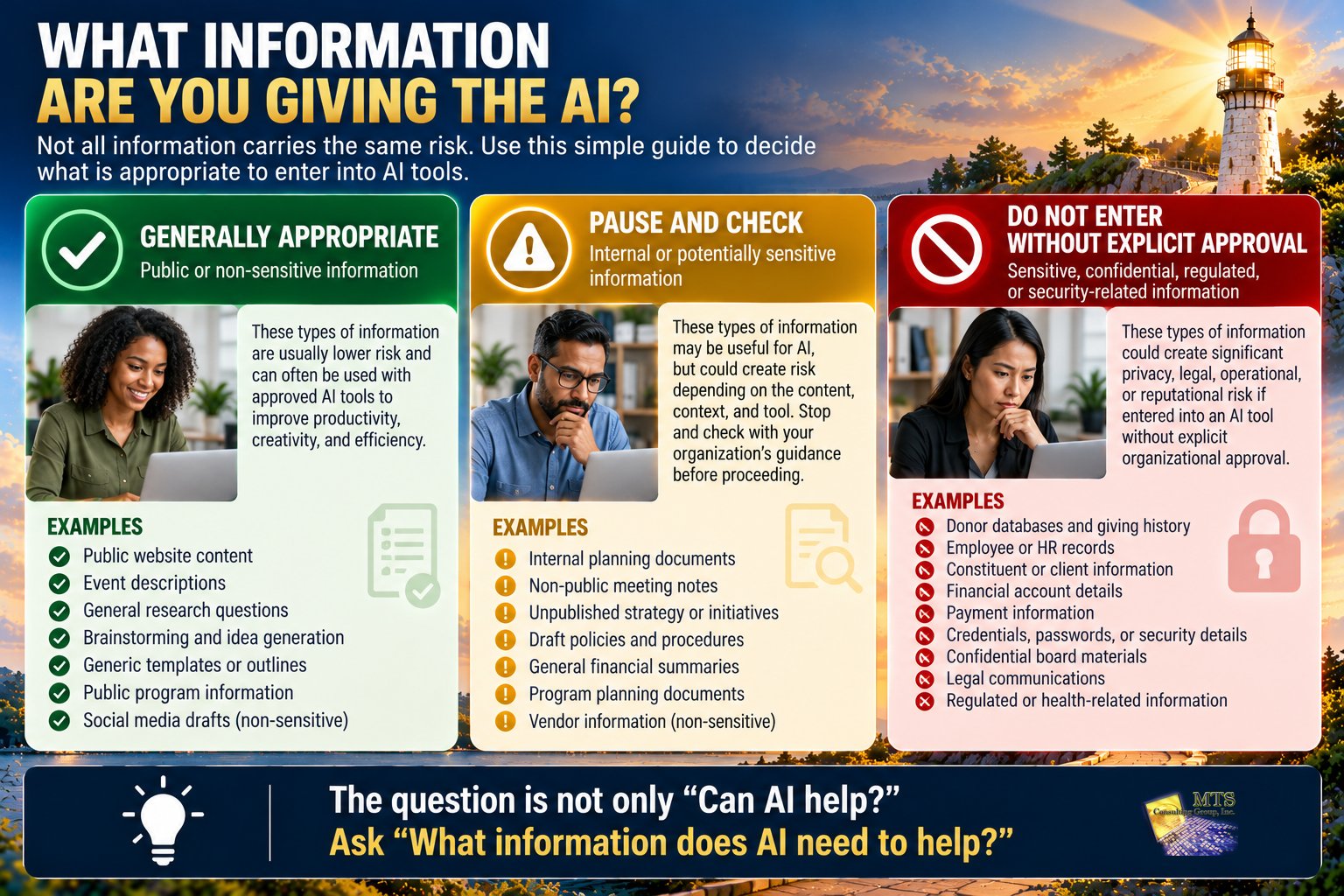
A Simple AI Traffic-Light Model
A nonprofit can create an easy three-level decision framework.
GREEN: GENERALLY APPROPRIATE
Public or non-sensitive information
Examples:
- public website copy
- brainstorming
- event descriptions
- general research
- generic templates
Leadership still decides which tools are approved.
YELLOW: CHECK BEFORE USING
Internal or potentially sensitive information
Examples:
- internal planning
- draft policies
- unpublished strategy
- financial summaries
- meeting notes
Ask whether the real information is necessary.
RED: DO NOT ENTER WITHOUT EXPLICIT APPROVAL
Sensitive, confidential, regulated, or security-related information
Examples:
- donor databases
- passwords
- personnel records
- constituent files
- payment information
- legal communications
- regulated data
The model is intentionally simple.
Employees are more likely to follow guidance they can remember.
AI Can Affect All Four Areas of Cyber Liability
AI governance is not just a privacy issue.
It can affect the four Cyber Liability areas discussed throughout this Knowledge Center.
Operational Risk
Could employees become dependent on an AI tool that becomes unavailable or produces unreliable results?
Could an AI-generated error affect an important process?
Reputational Risk
Could inappropriate AI use damage donor, employee, constituent, funder, or community trust?
Could inaccurate AI-generated public content affect the organization’s reputation?
Regulatory Risk
Could sensitive or regulated information be handled in a way that conflicts with organizational responsibilities?
Legal Risk
Could AI use affect privacy, contracts, intellectual property, employment, confidentiality, or other legal responsibilities?
One AI use case may touch several categories at once.
Educational Example: AI Generates the Wrong Answer
Imagine a nonprofit employee uses AI to draft information for a public program announcement.
The answer sounds polished.
It also includes an incorrect program eligibility requirement.
The employee publishes it without reviewing the output.
No sensitive information was exposed.
But there is still risk.
People may rely on the incorrect information.
Staff may have to correct communications.
Community trust could be affected.
This illustrates another important AI principle:
Data protection is not the only concern. Human review still matters.
AI Should Assist Judgment, Not Replace Accountability
AI can help employees:
- generate ideas
- draft language
- organize information
- summarize content
- identify patterns
- create first drafts
But someone still owns the decision.
If AI drafts:
- a donor communication
- a grant application
- an HR notice
- a policy
- financial commentary
- a board presentation
a responsible person should review the result.
Leadership should be careful with the assumption:
“The AI said it, so it must be correct.”
AI output should be treated as work that may require review, verification, and judgment.
The more important the decision, the more important human review becomes.
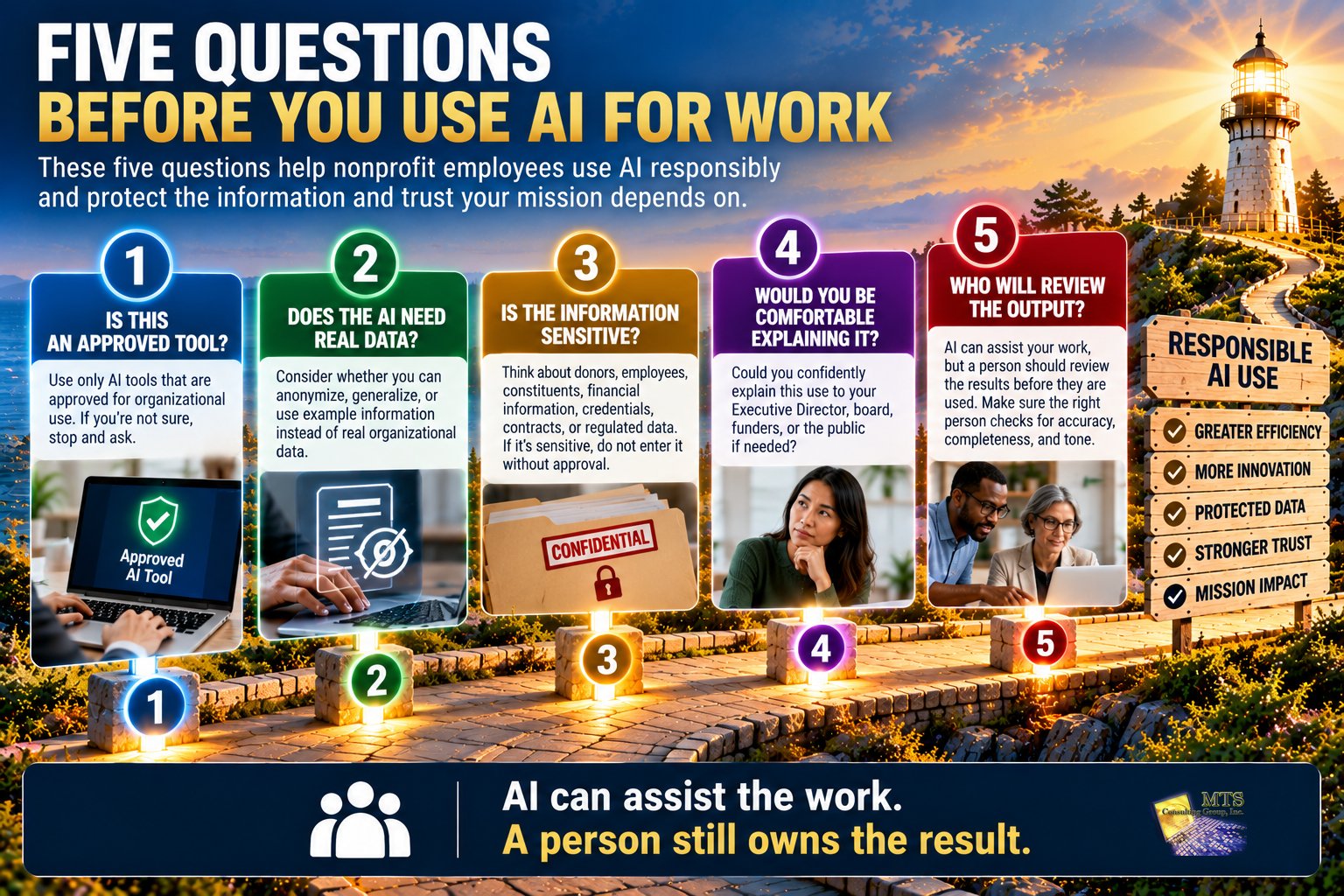
A Practical AI Review Before You Hit Enter
Before entering information into an AI tool, employees can ask five quick questions.
1. Is this an approved tool?
If not, stop and ask.
2. Does the AI need the real information?
Could the data be anonymized, summarized, or replaced with a fictional example?
3. Is any of this information sensitive?
Think about donors, employees, constituents, finances, credentials, contracts, or regulated information.
4. Would I be comfortable explaining this use to leadership?
If the answer is no, pause.
5. Who will review the AI output before it is used?
AI can assist the work.
A person should still own the result.
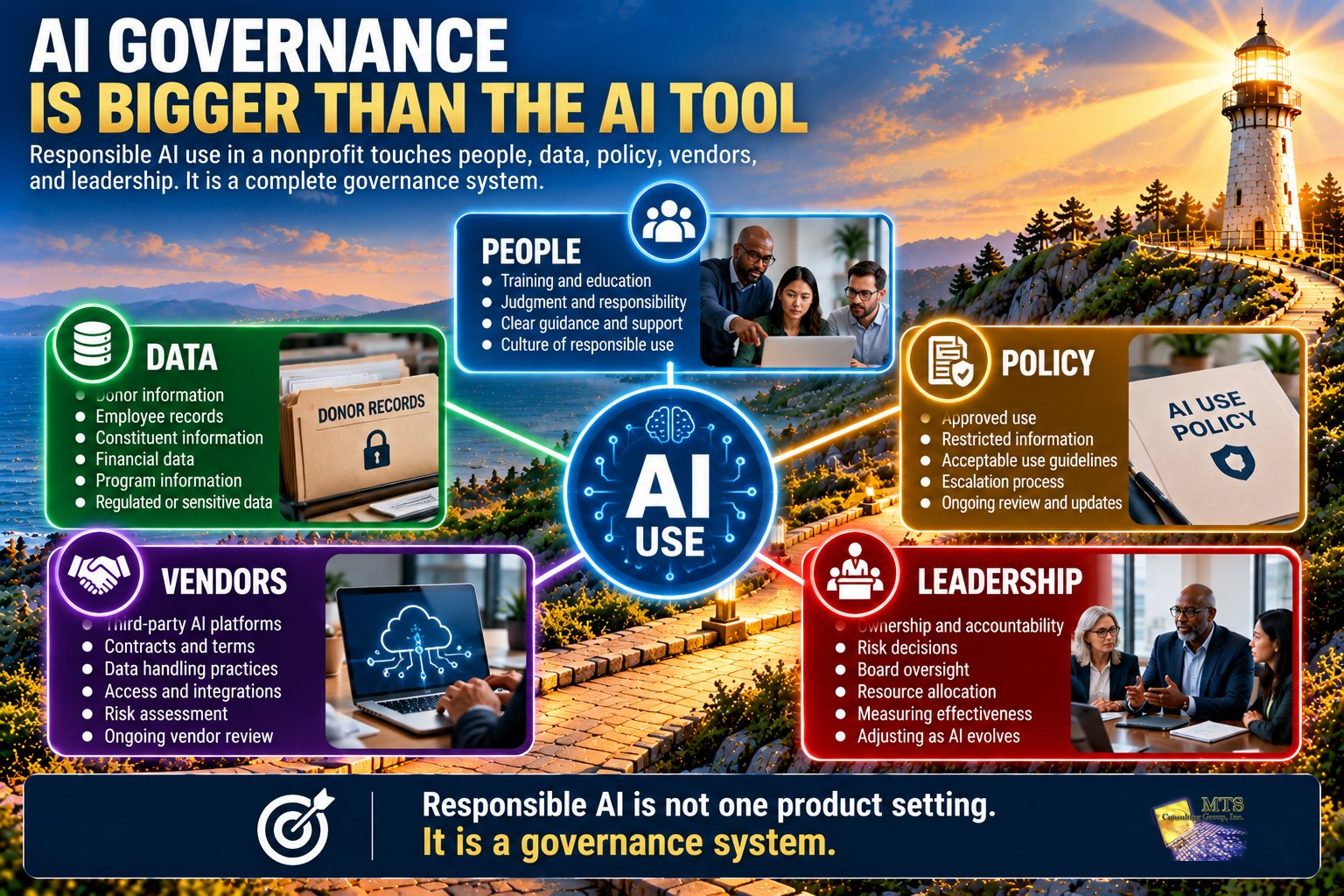
What Should a Nonprofit AI Policy Actually Cover?
An AI policy does not need to be 30 pages long to be useful.
At minimum, leadership should consider defining:
- approved tools
- prohibited tools, if applicable
- acceptable use
- restricted information
- sensitive data rules
- account requirements
- human review expectations
- employee responsibilities
- how to request approval
- how to report a concern
- who owns the policy
- when the policy will be reviewed
The policy should be written for employees, not just lawyers or technologists.
If staff cannot understand it, it will be difficult to follow.
Education Is as Important as the Policy
Publishing an AI policy is not the same as changing behavior.
Employees need examples.
Training can include questions such as:
- Can I use AI to draft a fundraising email?
- Can I paste donor information into AI?
- Can I use AI to summarize board minutes?
- Can I upload an employee document?
- Can I use an AI meeting assistant?
- What do I do if I already entered something I should not have?
- Who do I ask when I am unsure?
Practical scenarios are more useful than simply telling employees:
“Use AI responsibly.”
People need to understand what responsible use looks like.
A Realistic Nonprofit AI Governance Conversation
Imagine a nonprofit learns that several employees are using different AI tools.
Marketing uses one tool for social media.
Development uses another for fundraising copy.
Programs uses AI for document summaries.
An Executive Director uses a meeting assistant.
The organization could react by banning everything.
Or leadership could step back and ask:
- Which uses are helping us?
- Which involve sensitive information?
- Which tools should be approved?
- Which practices need boundaries?
- What education do employees need?
That conversation is much more productive.
It creates visibility without assuming that every AI use is dangerous.
What Should the Board Know About AI?
The board does not need a list of every AI application.
It does need enough visibility to understand whether governance exists.
Useful board questions might include:
- Do we know how AI is being used?
- Do we have an AI policy?
- Are employees receiving practical guidance?
- What sensitive information is restricted?
- Who approves new AI use cases?
- Are important AI vendors being reviewed?
- Have any significant AI-related risks been identified?
- When will leadership review the policy again?
The board’s role is oversight.
It does not need to select AI products or approve individual prompts.
AI Governance Should Become Part of Normal Governance
Eventually, AI should not feel like a completely separate category.
It belongs within the same disciplines already used for:
- data protection
- vendor risk
- employee education
- policy
- governance
- access
- Cyber Liability
- leadership accountability
That is a sign of maturity.
The question becomes less:
“What is our AI strategy?”
and more:
“How do we use AI responsibly as part of the way our organization already manages technology and risk?”
What Should a Nonprofit Leader Take Away From This Chapter?
AI can create real value for nonprofit organizations.
It can also create risk when use is invisible, unmanaged, or involves sensitive information without clear guidance.
Start with five questions:
- What AI tools are people already using?
- What information should never be entered without approval?
- Which tools are approved?
- Who owns AI governance?
- How will we review AI use over time?
The goal is not to stop innovation.
The goal is not to approve everything either.
The goal is to create enough clarity that employees can use AI productively without guessing about what is appropriate.
Good AI governance gives people a path.
It helps them know when to proceed, when to pause, and when to ask.
Applying the Education: How MTS Approaches Secure AI
MTS treats AI governance as part of the broader Cyber Liability conversation because unmanaged AI use can affect data protection, governance, vendor risk, Operational Risk, Reputational Risk, Regulatory Risk, and Legal Risk.
MTS identifies AI governance and data protection as a strategic review area because employees may enter sensitive client, donor, member, financial, HR, or regulated information into AI platforms without approval.
The question MTS uses to frame the discussion is simple:
AI may already be inside your organization. The question is not whether your team is interested in AI. The question is whether anyone is managing the risk.
MTS helps leadership look at:
- how AI is currently being used
- sensitive information
- approved tools
- governance
- employee education
- third-party risk
- policy
- organizational responsibility
MTS also maintains a Secure AI offering for organizations that want a more controlled approach to organizational AI use.
The goal is not to make AI more complicated.
It is to help leadership create enough structure that employees can use it with greater confidence.
The client remains the decision-maker.
A Practical Next Step
Ask your employees one question this week:
“What AI tools are you currently using for work?”
Do not start with enforcement.
Start with understanding.
Then ask:
“What are you using them for?”
Those two questions can give leadership a much clearer picture of where AI already exists inside the organization.
From there, you can begin deciding:
- what is helpful
- what needs guidance
- what should be restricted
- what should be approved
- what employees need to learn
Visibility comes before governance.
Continue Learning
Previous Chapter
Chapter 8: How Should Nonprofits Manage Cyber Risk From Vendors and Third-Party Systems?
Next Chapter
Chapter 10: What Should the First 90 Days of Reducing Cyber Liability Look Like for a Nonprofit?
By this point in the Knowledge Center, we have covered:
- what Cyber Liability is
- the four areas of risk
- people, technology, data, and third parties
- independent assessment
- prioritization
- board oversight
- backup and recovery
- vendor risk
- AI governance
Chapter 10 will bring those lessons together into a practical 30, 60, and 90-day leadership plan.
The goal will not be to fix everything.
It will be to create momentum, establish priorities, and give leadership a practical path forward.
Related
Explore how MTS approaches AI governance and the Secure AI offering on our Secure AI and Cyber Liability page.